Organizing Receipts for Small Business: 2026 Guide

What if every expense in your books had a receipt you could find in seconds? For many owners, receipts are scattered across email, paper files, and phones, making it hard to match a document to a transaction when it is time to review the books. A consistent approach to organizing receipts for small business bookkeeping connects each expense to a clear, retrievable record.
You don’t need a complicated system. You need a repeatable process for collecting receipts, checking them against recorded expenses, and storing them where you can find them again. That structure can make expense reviews and bank reconciliations smoother, while keeping bookkeeping records distinct from tax advice.
This guide covers practical ways to gather digital and paper receipts, connect supporting documents with transactions, and review records regularly. You’ll also learn what to consider when deciding how long to keep documents and how to protect them, so your receipt workflow can keep pace as your business grows.
Table of Contents
Why organizing receipts matters for small business bookkeeping
Organizing receipts for small business bookkeeping means capturing, identifying, storing, and reviewing expense documentation consistently. The goal isn’t just to keep receipts. It’s to make each expense understandable and its supporting record easy to find during a review.
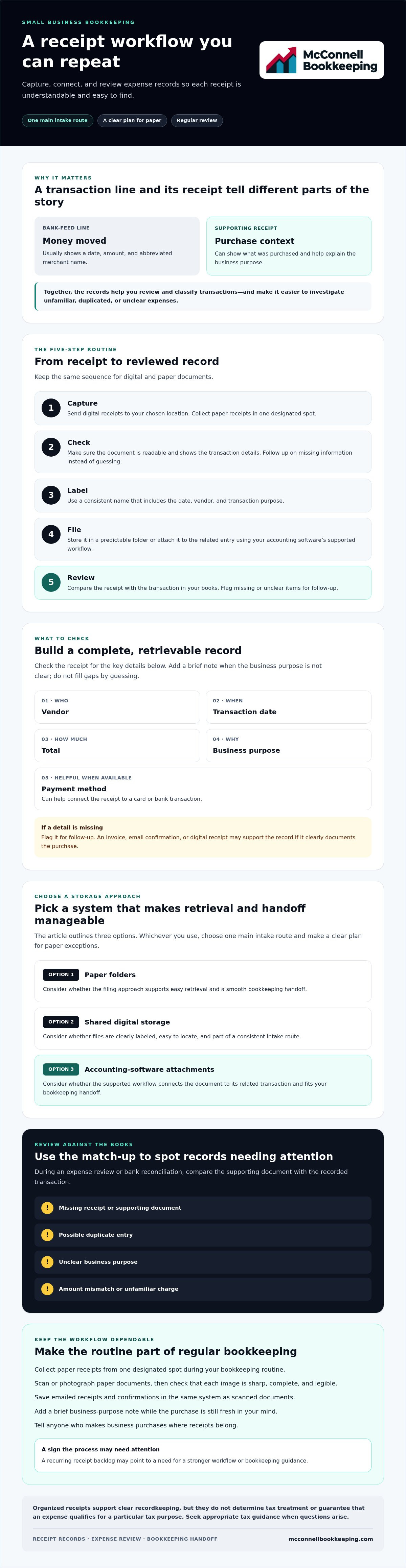
A receipt and a bank-feed line provide different details. The bank feed shows that money moved, usually with a date, amount, and abbreviated merchant name. A receipt can show what was purchased and provide context about the business purpose. Together, these records help you review and classify transactions as part of bookkeeping, the process of recording and organizing financial activity.
For a practical look at receipt organization, watch this video:
A complete, retrievable receipt record connects a supporting document to a transaction and includes the vendor, transaction date, total, business purpose, and payment method when available. Store it so you can find and read it during an expense review.
What information should a business receipt record include?
Check each receipt for the vendor, transaction date, and total. If the document doesn’t explain why the purchase was made, add a brief business-purpose note to your bookkeeping records. Include the payment method when available, especially if it helps connect the document to a card or bank transaction.
An invoice, email confirmation, or digital receipt may support the record if it clearly documents the purchase. If a detail is missing, flag it for follow-up rather than guessing. For example, a generic merchant name on a bank line may not tell you whether the purchase was for supplies, a client meeting, or a personal item.
How do receipts support accurate bookkeeping?
Receipts give you documentation to compare with recorded expenses, helping you apply categories consistently and investigate unfamiliar charges. During an account review or bank reconciliation, matching documents can help clarify whether a transaction is recorded correctly, duplicated, or still needs attention.
Organized receipts support clear recordkeeping, but they don’t determine tax treatment or guarantee that an expense qualifies for a particular tax purpose. Keep bookkeeping records complete and seek appropriate tax guidance when you have questions about how an expense should be treated.
How to organize small-business receipts in a repeatable workflow
A reliable process makes receipt collection part of regular bookkeeping instead of a catch-up project. Choose one primary route, such as a designated email folder, shared digital location, or accounting-software workflow. Tell anyone who makes business purchases where receipts belong, and set a clear plan for paper receipts so they don’t get stranded in a wallet or vehicle.
“A practical receipt workflow captures each document, checks its details, labels it clearly, files it securely, and reviews it against the books.” Use these five steps to make organizing receipts for small business bookkeeping consistent:
Capture: Send digital receipts to your chosen location and collect paper receipts in one designated spot.
Check: Confirm the document is readable and shows the transaction details. Follow up on missing information instead of guessing.
Label: Use a consistent name that includes the date, vendor, and transaction purpose.
File: Store the receipt in a predictable folder or attach it to the related entry using your accounting software’s supported workflow.
Review: Compare the record with the transaction in your books and flag missing or unclear items for follow-up.
How should owners capture paper and digital receipts?
Make paper collection a regular task, such as emptying a receipt envelope or designated tray during your bookkeeping routine. Scan or photograph each document, then check that the image is sharp, complete, and legible before filing it. Save emailed receipts and confirmations in the same system as scanned documents. If a receipt doesn’t explain the business purpose, add a brief note while the purchase is still fresh in your mind.
How should receipts be named and filed?
Choose a naming pattern your team can follow, such as date-vendor-purpose, and use it consistently. Keep folder names straightforward, or use an accounting-software attachment process your team understands. The Small business bookkeeping guide offers broader context for building a consistent bookkeeping approach. Limit access to appropriate team members, and use secure storage with backups to keep records protected and retrievable.
After using the system for a few weeks, check whether receipts are still landing in multiple places. If they are, simplify the intake route or clarify how to handle paper receipts. Owners who want to strengthen their software and data-entry practices can explore QuickBooks Online training to improve their bookkeeping workflow.
Paper receipts, digital files, or QuickBooks Online: which system fits?
The best receipt system is one your team can use consistently and connect to recorded transactions. A labeled paper folder may suit an owner with few receipts, while shared digital storage or receipt attachments in accounting software can make documents easier to retrieve during bookkeeping reviews. No single format fits every business.
Compare each option against the same practical needs: Can you find a receipt by date or vendor? Can everyone follow the filing process? Are records backed up, with access limited to appropriate team members? Can the person reviewing the books connect each receipt to the related transaction? The IRS guidelines on record-keeping provide a primary-source reference for the kinds of business records to maintain. Use them for recordkeeping context, not as a substitute for tax advice.
Paper folders: Simple to start and easy to review by month or category, but receipts can fade, get damaged, or be misplaced. Matching a paper document to a transaction may take longer if the filing system isn’t consistent.
Shared digital storage: Lets you keep scanned receipts and email confirmations in one accessible location. Clear folder names, appropriate permissions, and a dependable backup plan help keep the system useful and protected.
Accounting-software attachments: Keeping a receipt with its related bookkeeping entry can make transaction review more direct. Check the software’s current features and whether the process fits your team’s habits before making it your main method.
When can a paper-based receipt system work?
A paper approach can work for low-volume transactions if receipts go into labeled folders promptly and someone reviews them regularly. File by month or another simple category your team can maintain. Paper alone is less convenient when you need remote access or want to match transactions quickly. Consider scanning important records as a backup, and decide where originals will be stored to reduce the chance they’re lost or damaged.
What should owners consider before going digital?
Before choosing digital storage, test whether documents remain legible, searchable, and accessible to the people who need them. Decide who captures receipts and who checks that they’re filed. Software interfaces and features can change, so verify current instructions rather than relying on outdated steps. Choose a process that fits your transaction volume and existing habits. If you want more confidence using the software, explore QuickBooks Online training for business owners.
How to review receipts, match expenses, and keep records dependable
A recurring review turns collected receipts into useful support for your books. Set a regular time to compare each receipt with the corresponding recorded transaction. Check the vendor, date, amount, and business purpose, then resolve gaps while the purchase is still familiar. This makes organizing receipts for small business bookkeeping part of expense review, rather than a search for documents after questions arise.
Missing receipt: Flag the transaction and note who will look for the document or request a copy.
Possible duplicate: Compare dates, amounts, and vendors before deciding whether the entries represent separate purchases.
Unclear purpose: Ask the person who made the purchase for context instead of assigning a category based on a guess.
Amount mismatch: Check for tips, partial payments, credits, or other details that might explain the difference. Document any unresolved issue for follow-up.
How do receipts connect to bank reconciliations?
A bank statement confirms payment activity, while a receipt adds context about what the business bought and why. Compare the receipt date and total with the recorded transaction and statement, allowing for possible timing or posting differences. If you can’t explain a mismatch, note the question and revisit it rather than forcing a match. Organized documents can support smoother reviews through monthly bank reconciliations for Mesa and Phoenix small businesses.
During review, keep a simple list of open items that includes the transaction, what’s missing or unclear, and the next step. This creates a follow-up trail and helps prevent unresolved questions from disappearing into email or memory. Monthly bank reconciliations compare recorded activity with bank statements; receipts support the details behind expense entries. Each has a different role in maintaining dependable books.
How long should small businesses keep receipt records?
There isn’t one retention period that fits every receipt or business situation. Requirements can depend on the record type and circumstances, so verify current guidance with authoritative IRS and Arizona sources. For questions about how long to retain particular documents or other business-specific obligations, consult a qualified tax professional. Keep this retention check separate from routine receipt matching.
If missing receipts and unresolved transactions are becoming a recurring backlog, consider support with monthly bank reconciliations and books cleanup. These bookkeeping services can help bring recorded activity and supporting documents into clearer order.
When receipt organization needs bookkeeping support
A receipt process may need attention when documents keep piling up, expense descriptions remain unclear, or transaction reviews take longer because supporting records are hard to locate. These signs don’t always mean you need to hand off the entire workflow. A clearer intake route or defined staff responsibilities may be enough. But if gaps keep returning, bookkeeping guidance can help identify where the process is breaking down.
Consider whether you can routinely connect expenses to readable records and explain unfamiliar transactions. If you can, refining your current approach may be enough. If backlogs persist or reviews regularly uncover missing documents and unclear entries, outside support can help restore order and establish more dependable routines for organizing receipts for small business bookkeeping.
What should an owner prepare before asking for bookkeeping help?
Bring a small sample of current receipt records, relevant bank statements, and a short description of how documents are collected and filed. Note which expense categories or recurring purchases are difficult to identify. It also helps to clarify who captures receipts, who reviews them, and who approves expenses. This snapshot can reveal practical workflow gaps without requiring you to organize everything perfectly first.
How can ongoing bookkeeping support improve the process?
Monthly bank reconciliations help compare recorded activity with bank statements, while organized receipts provide context for reviewing expense entries. Together, they can make monthly reviews clearer and support useful financial statements. If historical records are incomplete or receipt backlogs have affected the books, books cleanup may help address older issues before you focus on maintaining a consistent process.
Owners can also improve their own workflow with guidance. For example, QuickBooks Online training can help strengthen software and data-entry practices. The right next step depends on whether the main challenge is collecting documents, recording expenses, or keeping the books current.
If receipt backlogs are making expense reviews difficult, consider discussing your bookkeeping needs with a provider. Small businesses in Mesa, Phoenix, Gilbert, Tempe, Chandler, and Scottsdale can explore support such as monthly bank reconciliations, books cleanup, or other available bookkeeping services.
Make your receipt process easier to maintain
Organizing receipts for small business bookkeeping works best when every document follows the same path: capture it, label it, file it, and review it against the related transaction. Choose a system your team can use consistently, and flag missing or unclear details instead of relying on memory. That routine makes expense reviews easier and gives you better support for monthly bookkeeping.
If receipt backlogs are making your records difficult to review, bookkeeping guidance can help you regain clarity. McConnell Bookkeeping provides monthly bank reconciliations and financial statement preparation, and QuickBooks Online training can help business owners strengthen their software use and bookkeeping practices.
Talk with McConnell Bookkeeping about clearer, more organized books. With a repeatable workflow and the right support, you can spend less time searching for records and review your business finances with greater clarity.
Frequently Asked Questions
How should a small business organize receipts?
Use one consistent capture route, clear labels, secure storage, and a recurring review to keep receipts easy to retrieve during bookkeeping. Organizing receipts for small business bookkeeping works best when the process is simple enough to maintain, rather than spread across disconnected apps. Preserve details such as vendor, date, and total, and promptly record the business purpose if it isn’t obvious from the receipt.
Can I use digital copies of business receipts?
Digital copies can be practical if they remain legible, complete, accessible, and backed up. Check current recordkeeping requirements that apply to your business before discarding paper originals, since acceptance can depend on the record and circumstances. Keep files in a secure location your bookkeeping team can access when needed. For guidance about requirements specific to your business and records, ask a qualified tax professional.
What information should I write on a business receipt?
Record the business purpose if it isn’t obvious, along with any missing vendor or transaction details. Keep the receipt connected to the correct expense record so you can review the supporting document alongside the entry. Add context promptly, while the purchase is still familiar. These steps help maintain clear bookkeeping records, but they don’t guarantee tax deductibility or replace professional tax advice.
How long should a small business keep receipts?
The appropriate retention period can depend on the record type, circumstances, and applicable requirements, so don’t rely on one universal number of years. Check current IRS and Arizona guidance, then consult a qualified tax professional about your business’s situation. In the meantime, keep receipt records organized and retrievable, and confirm a retention policy that reflects the requirements relevant to your records.
Do I need to keep receipts if I have bank statements?
Bank statements can help confirm that a payment occurred, but they may not explain what you purchased or why it was a business expense. A statement might show a merchant and amount without identifying the items or business purpose. Retain supporting records and match them to transactions during bookkeeping review. The documentation needed can vary with the transaction, so don’t assume a bank line tells the whole story.
Can QuickBooks Online store business receipts?
Accounting platforms may let users attach or associate documents with transactions, but features and steps can change. Verify current QuickBooks Online functionality and setup before relying on it for receipt storage. Whichever system you choose, keep a consistent capture and review routine. McConnell Bookkeeping offers QuickBooks Online training for business owners in Mesa, Phoenix, Gilbert, Tempe, Chandler, and Scottsdale who want help using the software effectively.
What should I do if I lose a business receipt?
Check your email, the vendor’s online account, and payment records to see whether you can retrieve a copy or supporting document. Record what you know about the transaction, then flag missing details for bookkeeping review instead of filling gaps with assumptions. Documentation needs can depend on the circumstances and applicable rules. If the missing receipt raises a tax-record question, consult a qualified tax professional.



Comments