New Business QuickBooks Setup in Phoenix: A Step-by-Step Guide

Your QuickBooks file is only as useful as the structure and habits behind it. A new business QuickBooks setup Phoenix owners can rely on involves more than entering company details: it establishes a clear way to record transactions, review cash flow, and keep reports meaningful.
It’s understandable to be unsure which settings and accounts to establish first, especially when launching a business already takes time and attention. Early categorization choices affect what your financial reports show. A thoughtful setup gives you a dependable foundation for tracking activity and making decisions. This guide covers the key steps for configuring QuickBooks Online, organizing accounts and transactions, and building a routine for reviewing your records.
You’ll also learn how QuickBooks Online training can help you understand the software and how regular bank reconciliations and financial statement preparation support accurate, useful books over time. The goal is a clean, usable file that helps you make informed decisions as your Phoenix business grows.
Table of Contents
Why a New Phoenix Business Needs a Thoughtful QuickBooks Setup
A dependable QuickBooks setup is a working system, not just a company name and a few account categories. It organizes your company file and establishes practical workflows for recording, classifying, and reviewing business activity. A clear structure helps you see where money comes from, what the business owes, and how spending changes over time.
QuickBooks offers different versions and tools for managing business finances. A general overview of QuickBooks accounting software can explain the product family, but your file still needs to reflect how your business operates. A solo consultant with a few client payments may need a different account structure from a business that handles inventory, payroll, or frequent vendor bills.
Consistent choices from the start make records easier to maintain. For example, separating software costs from supplies lets you compare those expenses in reports instead of sorting through one broad category later. That clarity supports financial statement preparation and makes cash flow easier to review. Build an account structure around your transaction volume and reporting needs rather than adding categories “just in case.”
Bookkeeping setup organizes how business activity is recorded; it doesn’t form a business entity, file income tax returns, or provide legal or tax advice. Your business structure can affect how transactions should be represented, and accounting-method decisions can have tax implications. Get qualified tax guidance where needed, then configure the bookkeeping workflow to match the decisions that apply to your business.
What should a new business QuickBooks file help you do?
A useful file gives each transaction a consistent place and supports clear reporting. It should help you record income and expenses, track assets and liabilities, and distinguish owner contributions from sales or loans. It should also make it easier to keep business activity separate from personal spending, review performance, and identify entries that need attention.
Reports are only as useful as the transactions behind them. Categorize income and expenses consistently, then review the entries so reports show meaningful patterns rather than a backlog of uncategorized activity. If you can’t identify the purpose of a purchase or deposit, investigate it before deciding how to classify it.
Which setup decisions matter before entering transactions?
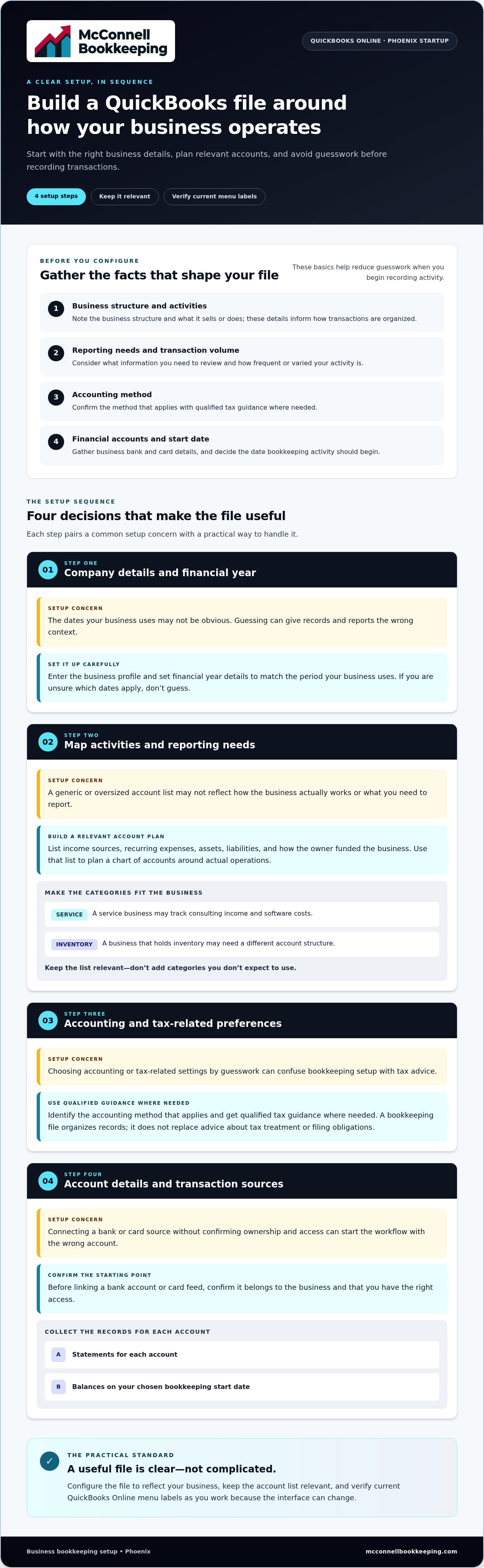
Gather a few basics before configuring the file. These details help shape the account structure and reduce guesswork when you start recording activity:
Business structure and activities: Note the structure of the business and what it sells or does. These details inform how transactions are organized.
Reporting needs and transaction volume: Consider what financial information you’ll need to review and how frequent or varied your activity is. A simple service business may need fewer categories than one with payroll or complex purchasing.
Accounting method: Confirm the appropriate method with qualified tax guidance where needed. Software configuration is not a substitute for tax advice.
Financial account details: Gather business bank account and card information, along with the date bookkeeping activity should begin. These details establish a clear starting point for recording transactions.
For Phoenix owners, a thoughtful new business QuickBooks setup Phoenix approach starts with these operating facts and builds a recordkeeping structure around them. That foundation helps keep the file understandable as the business grows and its reporting needs change.
How to Set Up QuickBooks Online for a Phoenix Startup
Work through setup in sequence, and verify the current QuickBooks Online menu labels as you go because the interface can change. The goal is not to create every possible account or turn on every feature. Make choices that fit your business and establish a reliable starting point for entering and reviewing transactions.
Step 1: Enter company details and financial year information. Add the business profile carefully, then set the financial year details to match the period your business uses. These basics provide context for records and reports, so don’t guess if you’re unsure which dates apply.
Step 2: Map your activities and reporting needs. List how the business earns income, its recurring expenses, any assets and liabilities, and how the owner has funded it. Use that list to plan a chart of accounts that reflects actual operations. For example, a service business may track consulting income and software costs, while a business that holds inventory may need a different structure. Keep the list relevant instead of adding categories you don’t expect to use.
Step 3: Set accounting and tax-related preferences with care. Identify the accounting method that applies to your business and get qualified tax guidance where needed. Don’t select tax-related settings by guesswork. A bookkeeping file can organize records, but configuring it doesn’t replace advice about tax treatment or filing obligations.
Step 4: Gather account details and connect transaction sources. Before linking a bank account or card feed, confirm it belongs to the business and that you have the right access. Collect statements for each account, including the balances on your chosen bookkeeping start date. Feeds can import transactions into QuickBooks, but you still need to review each item. Match an imported transaction to an existing entry when appropriate; an import is not a reconciliation.
Step 5: Enter and verify opening balances. Use statements and other reliable records to establish what the business held or owed on the start date. Record each opening balance once. If you also import transactions from before or on that date, check for overlap. Entering an opening balance and then recording the same activity again can distort the books.
Step 6: Test entries and review initial reports. Enter or review a representative transaction, then check its date, account, amount, and business purpose. Run the profit and loss statement and balance sheet. Look for issues such as income appearing as an expense or a business bank account missing from the balance sheet. Investigate unexpected results before relying on the reports.
A careful new business QuickBooks setup Phoenix owners build step by step makes later transaction reviews more straightforward. If you want to understand the setup while learning the software, QuickBooks Online training can help you build confidence with data entry, reporting, and key features.
DIY or Guided QuickBooks Setup in Phoenix: Which Fits Your Situation?
There isn’t one right setup path for every startup. A new business QuickBooks setup Phoenix owners manage themselves may work well when operations are straightforward and they have time to learn the software. Guidance can help when transactions are more involved, an owner wants to build confidence, or existing records need attention. Use the comparison below as a starting point, not as a rule that every business needs outside help.
When self-setup may be manageable
A solo business with one primary income stream, a business bank account, and uncomplicated expenses may find self-setup manageable. Keep the file lean, and note why you chose key account categories or settings. That record helps you stay consistent as transactions come in. DIY doesn’t mean “set it and forget it”: review categorized activity, balances, and reports regularly so small uncertainties don’t accumulate.
When training or bookkeeping guidance can help
More moving parts can make a setup harder to validate alone. Multiple income streams, employees, recurring transactions, or specific reporting needs may call for a closer look at how information flows through the file. QuickBooks Online training builds confidence with data entry, reporting, and software features, so you understand how to use the setup rather than simply inherit it. If opening balances are uncertain or prior records contain errors, a review can help identify issues before you build new records on top of them. Books cleanup can address existing bookkeeping problems and establish a clearer base going forward.
How to choose the right level of support
Match the level of help to three things: the time you can commit, your comfort with QuickBooks, and the complexity of your transactions. You might want training to manage day-to-day entry yourself, help correcting an existing file, or recurring bookkeeping support to keep records current. Learning the software and delegating ongoing bookkeeping are different choices. You can choose one or combine them based on your needs.
Phoenix-area owners can explore QuickBooks Online training and bookkeeping support. Training and support can help you understand your records, improve the file where needed, and choose a sustainable way to maintain it.
Keep a Phoenix Business's QuickBooks Records Accurate After Setup
A clean company file is a strong starting point, but accuracy depends on what happens next. Record transactions consistently, keep supporting documents, and review the books on a recurring schedule. Bank feeds can save data-entry time by downloading activity, but an imported transaction is not automatically correct, properly categorized, or reconciled to the bank statement.
Create a simple monthly bookkeeping routine
Use a repeatable close process that fits your business rather than waiting until a report looks confusing. Collect statements and source documents for each business bank account and card, then compare them with the activity in QuickBooks. Receipts, invoices, and payment records help explain transactions and support consistent categorization.
Review imported activity. Check each transaction’s date, amount, payee, and business purpose. Investigate uncategorized items and unusual charges instead of assigning a category just to clear the list.
Match entries carefully. If a downloaded item corresponds to a transaction already entered in QuickBooks, match the records rather than creating a duplicate. Confirm that the amount and details agree.
Reconcile each account to its statement. Compare the account’s recorded activity and balance with the statement for the same period. Review differences, such as a missing transaction or a duplicate entry, and resolve them before relying on the balance.
Review reports after reconciliation. Once differences are addressed, examine the financial statements for unexpected changes or balances that need explanation.
Bank-feed downloads and reconciliation serve different purposes. A feed brings transactions into the file; reconciliation compares recorded activity with the financial institution’s statement. Monthly bank reconciliation services for Phoenix businesses support this recurring accuracy check and help keep records ready for review.
Use reports to spot questions early
Treat reports as prompts for investigation, not automatic proof that every entry is correct. A profit and loss statement can show changes in income and expenses over time, but revenue isn’t the same as cash available in the bank. Unpaid customer invoices, upcoming bills, and other timing differences can affect cash flow.
Review the balance sheet for unexplained balances or activity that may have landed in the wrong account. If an asset, liability, or owner-related balance looks unexpected, trace it to the underlying entries and supporting records. QuickBooks training for business owners in Chandler can help you build confidence reading reports and using the software’s features.
A reliable new business QuickBooks setup Phoenix owners can maintain depends on ongoing review, not just initial configuration. For help keeping records aligned through monthly reviews, explore monthly bank reconciliation support.
Get New-Business QuickBooks Guidance from McConnell Bookkeeping
Your next step depends on what would make bookkeeping clearer and easier to maintain. You might want to learn how to enter transactions yourself, improve a QuickBooks file that has become confusing, or create a steady process for keeping records accurate. McConnell Bookkeeping supports Phoenix-area business owners with QuickBooks Online training, books cleanup, monthly bank reconciliations, and financial statement preparation.
That support can suit different levels of involvement. Build your understanding of the software, address existing recordkeeping issues, or bring in recurring support for account review. The aim is practical clarity: understand what your records show and have a dependable way to maintain them as business activity develops.
Build confidence with QuickBooks Online training
QuickBooks Online training covers data entry, reporting, and software features. Instead of relying on trial and error, owners can learn how daily bookkeeping choices affect the information they review. Training can support hands-on owners who want to manage routine entries themselves, as well as those who want to understand reports while getting help with other bookkeeping tasks. The right learning focus depends on your comfort with the software and how involved you want to be.
With a clearer grasp of the workflow, you can make more informed decisions about recording activity and reviewing results. You can also more easily recognize when an entry or report needs a closer look.
Maintain clarity with reconciliations and financial statements
Monthly bank reconciliations compare recorded account activity with bank statements, helping identify differences that need attention. Financial statement preparation organizes reviewed bookkeeping information into reports that offer a clearer view of business activity. Together, these practices connect day-to-day records with the larger picture, so you can review results with greater confidence. McConnell Bookkeeping serves businesses in Phoenix and nearby communities, including Mesa, Gilbert, Tempe, Chandler, and Scottsdale.
If your QuickBooks file contains inconsistent categories, unexplained balances, or incomplete records, books cleanup can help address those issues before you rely on the information for decisions. If you’re starting fresh, training can help you understand the system you’ll use, while ongoing reconciliations and financial statements can support accurate records over time. Choose support that reflects your goals, transaction activity, and preferred level of hands-on involvement.
A new business QuickBooks setup Phoenix owners can rely on is the beginning of an ongoing bookkeeping process, not a one-time software task. Talk with McConnell Bookkeeping about your QuickBooks needs and discuss a practical bookkeeping path for your new business.
Give Your New Business a Clear Financial Starting Point
Your bookkeeping can grow alongside your business. As services, customers, and day-to-day activity change, revisit whether your QuickBooks workflow still gives you a useful view of the decisions ahead. The right level of support can help you stay engaged with your numbers without having to solve every software question alone.
For a new business QuickBooks setup Phoenix owners want to understand and maintain, McConnell Bookkeeping offers QuickBooks Online training focused on data entry, reporting, and software features. Monthly bank reconciliations and financial statement preparation help keep records aligned and make business activity easier to review. Support is available to businesses in Phoenix and nearby communities.
Choose a practical next step that fits how you want to manage your books. Discuss QuickBooks Online training and bookkeeping support with McConnell Bookkeeping and take a confident step toward clearer business records.
Frequently Asked Questions
How do I set up QuickBooks Online for a new business?
Start by confirming your business profile and bookkeeping start date, then shape the accounts and transaction workflow around the activity you expect to record. For a Phoenix startup, decide how you’ll record situations such as customer deposits or owner funding so entries stay consistent. Before relying on reports, test a few transactions and check that they appear in the intended accounts. This new business QuickBooks setup Phoenix process gives you a file you can understand and maintain.
Can I set up QuickBooks myself, or should I get help?
You can set it up yourself if your transactions are straightforward and you have time to learn the software and review your choices. Guidance may help if you’re unsure about opening balances, have inherited records, or need reports that reflect several types of business activity. For example, an owner who wants to enter transactions daily but isn’t confident reading reports could benefit from training without handing off all bookkeeping tasks.
What should be included in a new business's QuickBooks chart of accounts?
Include accounts that reflect the business’s actual activity: income sources, operating expenses, assets, liabilities, and owner equity. A design studio might track project income and equipment, while a retailer may need categories for inventory-related activity. Avoid creating a long list of hypothetical accounts. Clear, relevant names make it easier to classify transactions consistently and understand each report line as the business grows.
When should I connect my business bank account to QuickBooks?
Connect a business account after you’ve created the company file and confirmed you have authorized access to the correct bank or card account. Check the feed’s starting date and available transaction range before accepting imported activity. If the feed includes transactions from before your bookkeeping start date, review them carefully to avoid overlap with opening balances or entries already in the file. Use a business account, not a personal account, for routine company activity.
Do I need to enter opening balances when setting up QuickBooks?
Enter opening balances when the business already has money, property, debt, or other recorded balances on the bookkeeping start date. Use reliable account statements or records to support the amounts. A business with no prior activity may have a simpler starting point, but funds or assets contributed before the start date can still affect what belongs in the opening figures. If the amounts are uncertain, have them reviewed before adding transactions that depend on them.
How often should a new business reconcile its QuickBooks accounts?
Reconcile each account monthly against its statement, including business bank and credit card accounts. Regular monthly reviews help surface missing entries, duplicates, or timing differences while relevant documents are easy to locate. Reconcile after the statement is available, and investigate any difference rather than forcing the balance to match. Businesses with frequent activity can also review transactions during the month, but those checks don’t replace a statement-based reconciliation.
Can McConnell Bookkeeping help Phoenix business owners with QuickBooks?
Yes. McConnell Bookkeeping supports business owners with QuickBooks Online training, books cleanup, monthly bank reconciliations, and financial statement preparation. Training covers data entry, reporting, and software features, helping owners understand how to work with their records. Support serves businesses in Phoenix and nearby communities, including Mesa, Gilbert, Tempe, Chandler, and Scottsdale. Whether you want to learn the software or bring more consistency to existing books, support can be shaped around your bookkeeping needs.



Comments