What to Look for in QuickBooks Training: A 2026 Guide

What if a QuickBooks lesson shows you where to click but not how your entries affect your reports? Knowing what to look for in QuickBooks training means looking beyond software steps. You need practical guidance that reflects your business workflows, helps you record transactions accurately, and connects everyday bookkeeping choices to clear financial information.
Whether you enter transactions, review reports, or oversee routine bookkeeping, the right learning should fit your responsibilities in QuickBooks Online. This guide explains how to assess a curriculum, practice opportunities, and instruction on reporting. It also covers how to decide whether a credential matters for your role as an owner. You’ll learn which skills can help make records more accurate and reports more useful, how to spot lessons that are too generic, and how McConnell Bookkeeping’s QuickBooks Online platform supports its monthly bookkeeping services.
Table of Contents
What Should QuickBooks Training Help a Small Business Owner Do?
Useful QuickBooks Online training should help you complete the tasks your business depends on and understand how those actions shape your records. Learning where to click is only a start. You also need to know what information to enter, how to review it, and what the resulting reports show. The goal isn’t to master every menu. It’s to handle your responsibilities accurately and consistently.
Transaction records contribute to the financial information you use to understand business activity. If a purchase is assigned to the wrong category, for example, expenses may appear differently in reports. Training should explain the link between daily bookkeeping choices and the information you later review. For an overview of the software’s broader uses, see this introduction to QuickBooks accounting software.
Start with the bookkeeping tasks you handle
Before assessing a curriculum, list the tasks you perform or oversee in QuickBooks Online. Note where you hesitate, too. You might enter transactions routinely but feel unsure about reviewing reports. Or you may oversee the books without making daily entries. Those roles call for different learning priorities, so choose instruction that starts with your responsibilities and current knowledge.
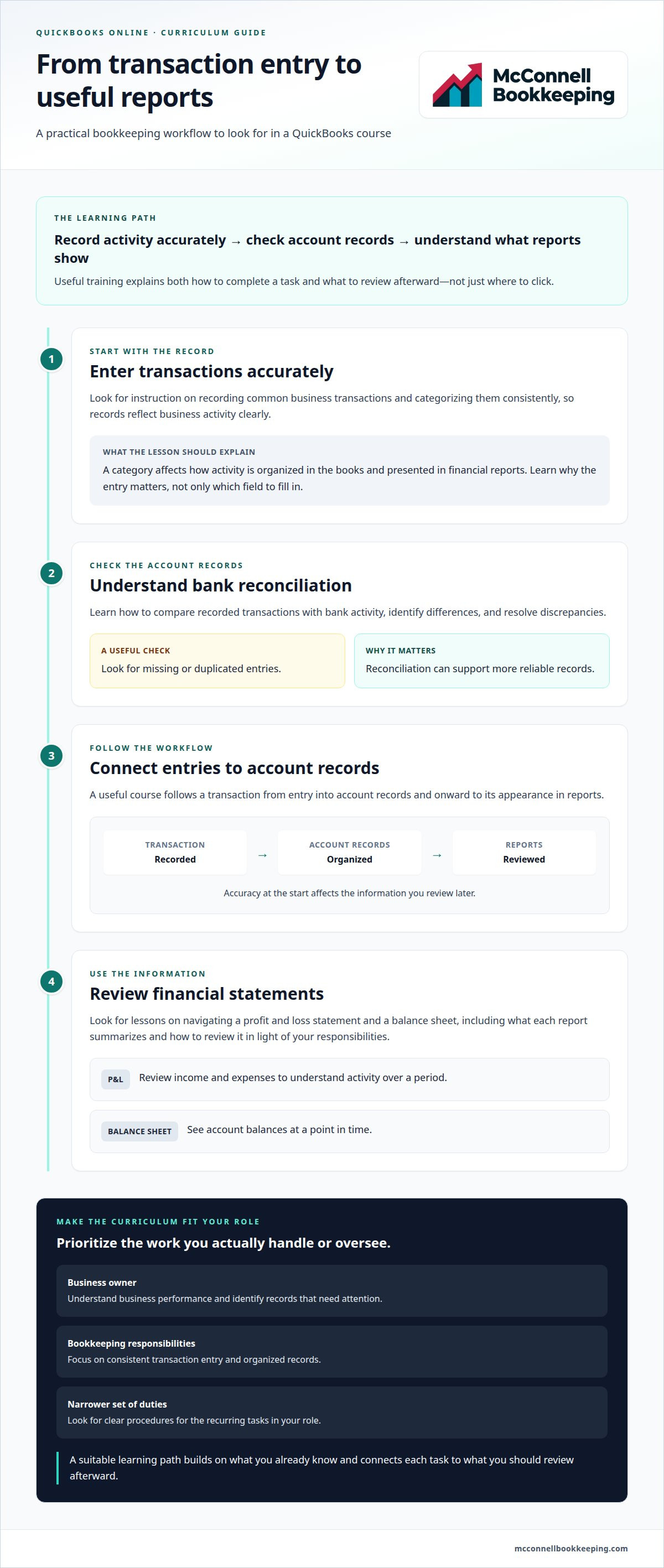
An owner may want to understand business performance and identify records that need attention. Someone responsible for bookkeeping tasks may focus on consistent transaction entry and organized records. A staff member who handles a narrower set of duties may benefit most from clear procedures for those recurring tasks. The curriculum should build on what you already know rather than assume every learner needs the same starting point.
Separate your goals into two groups: tasks you complete regularly and review responsibilities you want to handle with greater confidence. That distinction helps you decide whether to prioritize data entry, report interpretation, or both. It also helps you recognize relevant lessons rather than spending time on features you may not use.
Look for learning that explains the why
Practical QuickBooks training for a small business owner should teach relevant workflows and explain how each action affects records and reporting.
Categorizing a transaction, for example, is more than filling in a field. The category determines how the activity is organized in the books and presented in financial reports. When instruction explains this relationship, you can make more informed entries and recognize when something needs a closer review. That understanding supports clearer records and more useful reporting.
As you consider what to look for in QuickBooks training, check whether lessons connect steps to outcomes. Can you explain why a task matters, rather than simply repeat the clicks? Do you know what you’re responsible for and what to review afterward? A suitable learning path should reflect your business processes, match your current skill level, and build reliable habits for the work you actually do.
Which QuickBooks Online Training Topics Should the Curriculum Cover?
A useful curriculum follows the flow of bookkeeping, from recording activity to checking account records and using reports. The right topics depend on what you handle or oversee, so a course shouldn’t treat every feature as equally important. Start with the workflows that keep records organized, then consider additional tools that support your work.
Core workflows to look for in a QuickBooks course
Prioritize repeatable tasks and the checks that help you maintain dependable records. When reviewing a curriculum, look for instruction that explains both how to complete each task and what to review afterward.
Accurate data entry: Learn how to record common business transactions and categorize them consistently, so your records reflect activity clearly.
Bank reconciliation concepts: Understand how to compare recorded transactions with bank activity, identify differences, and resolve discrepancies. Reconciliation can help reveal missing or duplicated entries and support more reliable records.
Financial statement review: Learn to navigate a profit and loss statement and a balance sheet. Training should explain what each report summarizes and how to review it in light of your responsibilities.
Connected workflows: Follow a transaction from entry into account records to its appearance in reports. This connection shows why accuracy at the start matters later.
These fundamentals give owners and staff a practical base for recurring bookkeeping. For broader small-business guidance on financial records and statements, the U.S. Small Business Administration guide on managing business finances offers a useful reference.
McConnell Bookkeeping uses QuickBooks Online for monthly bookkeeping, including precise transaction recording and bank reconciliations. Learn more about McConnell Bookkeeping.
Reporting and platform features that support your work
Reports are most useful when you know what question you’re trying to answer. A curriculum should show you how to find relevant reports and understand their information, rather than simply point out where the report menu is. For example, you might review income and expenses to understand activity over a period, then use the balance sheet to see account balances at a point in time.
Look for instruction on platform features that ties each feature to a real task. A feature is worth learning when it helps you record, organize, or review business information more effectively. Lessons should explain when it fits your workflow and what to check afterward. Not every learner needs to master advanced tools.
Use your role to separate essential topics from optional ones. If you mainly record transactions, prioritize accurate entry, categorization, and the review steps connected to that work. If you oversee the books, give more attention to reconciliations and reports. Advanced features can wait until you have a clear business need. That focus is central to what to look for in QuickBooks training: a curriculum that connects your tasks to the records and reports they shape.
How Can You Tell Whether QuickBooks Training Is Practical?
Finishing a lesson doesn’t automatically mean you can use what you learned in your business. A feature demonstration may show which buttons to select, but practical instruction also explains how a task fits into a bookkeeping workflow, what the result means, and what to review next. This helps you judge whether the learning applies to your regular responsibilities.
For example, a lesson might show how to record a business purchase. A more complete exercise would also cover categorizing it, reviewing it in the account records, and understanding where it appears in a report. This context can help you catch uncertainty before the same mistake becomes part of your routine. For broader recordkeeping context, the IRS guidance on business recordkeeping explains the value of maintaining clear records of business income and expenses.
Recognize practice that reflects everyday bookkeeping
Look for exercises built around tasks you actually perform or oversee, not just isolated clicks. A useful activity takes you from an initial entry through a review step, then asks you to explain how the information supports your records. This helps you see what you understand and where you need more practice before applying the workflow in your business.
Consider whether the examples resemble your business activity. A service business and a business that tracks inventory may have different learning priorities, so generic practice may not address every learner’s needs. You don’t need a lesson for every possible scenario. You do need enough relevant practice to apply the concepts to the transactions and review responsibilities you handle.
Can you complete a relevant task without relying only on a sequence of clicks?
Can you explain what to review after entering or categorizing information?
Can you connect the practice task to the record or report it affects?
These questions aren’t a formal scorecard. They help you assess whether a lesson builds usable understanding rather than short-term familiarity with a screen.
Treat certificates as one signal, not the whole test
A professional credential can matter to someone whose work involves supporting clients or demonstrating product knowledge. A business owner may have a different goal: handling selected QuickBooks Online tasks accurately and understanding the records they rely on. A certificate alone doesn’t show whether a course addresses your business processes, so weigh its relevance alongside the practical skills you’ll gain.
Reconciliation is one area where workflow understanding matters. Training should clarify how reviewing account activity helps maintain dependable records. The practical test is whether you can describe the purpose of the task and understand what you’re reviewing, not whether you’ve completed a particular credential.
Ultimately, what to look for in QuickBooks training is a connection between realistic practice and clear explanations. If you can apply the workflow to your responsibilities and explain why each review step matters, you’re better prepared to use what you’ve learned with confidence.
How Do You Match QuickBooks Training to Your Business Needs?
The most useful learning path starts with your responsibilities, not a preset list of features. A simple process can help you focus on current gaps and leave less relevant topics for later. This keeps your goals manageable and gives you a practical way to judge whether your learning is helping.
Set priorities before choosing a learning path
Begin by listing the tasks you handle in QuickBooks Online and the questions you still can’t answer confidently. Then consider how often each task comes up and how important it is to keeping your business records clear and useful. This helps distinguish immediate needs from topics that can wait, instead of trying to learn every feature at once.
Define your role. Note whether you enter transactions, review records, oversee bookkeeping, or handle a combination of tasks. Focus on your responsibilities, not every task the software can support.
Identify the sticking points. Write down where you pause or feel uncertain. You might know how to enter information but need help reviewing it or finding a relevant report.
Rank your priorities. Put frequent, important tasks first. Recurring workflows that affect your records deserve attention before occasional features you may not use.
Match instruction to your familiarity. If you’re new to a task, start with clear explanations of its purpose and steps. If you know the basics, focus on specific questions or ways to improve consistency.
Choose a progress check. Decide how you’ll apply what you learn, such as explaining an entry, completing a familiar workflow more accurately, or locating and understanding a report tied to your responsibilities.
This approach helps prevent two common mismatches: spending time on features that don’t support your current work, or skipping a foundational topic that leaves you unsure about routine tasks. Add new priorities as your responsibilities change.
Measure progress by applying what you learn
Progress shows up in the work itself. After learning a process, ask whether you can explain the purpose of an entry, locate a related report, and complete recurring tasks more consistently. Notice whether your records are easier to follow and whether reports answer the questions you need them to answer.
Confidence doesn’t mean never having a question. It means recognizing what you understand, knowing what needs another look, and having a clear next step. If an entry remains confusing or a report is hard to interpret, revisit that topic instead of assuming you should move on. Targeted practice can help turn an unresolved question into a more reliable routine.
McConnell Bookkeeping uses QuickBooks Online for its monthly bookkeeping services, which include precise transaction recording and bank reconciliations. Visit McConnell Bookkeeping to learn about its services.
What to Expect from McConnell Bookkeeping QuickBooks Online Training
McConnell Bookkeeping uses QuickBooks Online to provide monthly bookkeeping for small businesses. This work includes precise transaction recording and monthly bank reconciliations, which help keep financial records organized. QuickBooks Online also supports the firm’s focus on turning financial data into useful information for business owners.
For an owner learning the software, it helps to understand how routine actions connect to the records and reports used to review business activity. You might want to improve how you enter transactions, understand the reports you rely on, or use platform features more effectively. Focus your learning on practical knowledge that supports organized records and informed use of your bookkeeping information.
Training grounded in bookkeeping workflows
McConnell Bookkeeping’s monthly bookkeeping includes precise transaction recording and bank reconciliations, while its Financial Analysis provides data and insights to support informed decisions. This bookkeeping perspective adds context to common workflows: accurate entries support dependable records, and careful review makes information more useful for reporting and analysis.
For example, learning how to enter and review transactions can help you see how individual records contribute to a broader financial picture. Familiarity with reports and platform features can also clarify how they support your workflow. Set learning goals according to your role and current experience, and focus on the QuickBooks Online tasks that matter to your small business.
Local support for small businesses
McConnell Bookkeeping serves Mesa, AZ and the Phoenix business community, including small businesses in Gilbert, Tempe, Chandler, and Scottsdale. The firm’s monthly bookkeeping uses QuickBooks Online and includes precise transaction recording and bank reconciliations. Organized records can give owners a clearer foundation for reviewing business information.
When deciding what to look for in QuickBooks training, prioritize instruction that connects platform use to accurate records and meaningful reports. McConnell Bookkeeping’s work with QuickBooks Online, monthly reconciliations, and financial analysis provides practical context for the bookkeeping workflows small businesses rely on.
Explore McConnell Bookkeeping’s small business bookkeeping services to learn how its QuickBooks Online bookkeeping can support organized records and financial reporting.
Put Your QuickBooks Knowledge to Work
Your next step is to turn learning into a routine you can sustain. Choose one task you handle regularly, apply what you’ve learned, and note any point where you still feel uncertain. Those questions can guide your next round of practice and help you build confidence without trying to master every feature at once.
As you decide what to look for in QuickBooks training, think beyond the lesson itself. The lasting value comes from applying new knowledge thoughtfully and refining your approach as your needs change. Clear, consistent steps can make it easier to work with your records and use the information they provide.
McConnell Bookkeeping’s monthly bookkeeping uses QuickBooks Online to record transactions and reconcile bank accounts each month. Explore McConnell Bookkeeping’s monthly bookkeeping services and take a confident next step toward more organized records and useful financial information.
Frequently Asked Questions
Is QuickBooks training worth it for a small business owner?
It can be worthwhile if you regularly use QuickBooks Online and want to handle business records with greater confidence. For example, training may help you understand what to review when a report looks different from what you expected, rather than leaving you unsure where to begin. To judge what to look for in QuickBooks training, consider whether the skills address real decisions and tasks you face, not just features you rarely use.
What should beginner QuickBooks Online training include?
Beginner training should introduce common bookkeeping tasks in a clear sequence and explain the purpose of each step. It can also help learners understand basic account and report terminology so they can follow what they’re seeing in QuickBooks Online. A useful exercise might take a sample business transaction from recording through review, then discuss what to examine if the information doesn’t appear as expected.
Do I need QuickBooks certification to use QuickBooks for my business?
No, you don’t need a QuickBooks certification simply to use QuickBooks Online for your own business. A credential may be relevant to someone pursuing professional recognition or developing skills to support other businesses, but it’s different from learning the tasks you need as an owner. Focus on whether you can carry out your responsibilities and understand the records you rely on, rather than treating certification as a prerequisite.
How can I tell whether QuickBooks training is working?
Look for practical signs in your day-to-day work. Can you repeat a task with less reliance on step-by-step prompts? Can you explain why you handled a transaction a certain way and identify what you’d review if something seemed unusual? You might keep brief notes about questions that arise during routine bookkeeping and revisit them after learning. Clearer reasoning and more consistent processes are useful signs of progress.
Can QuickBooks training help me understand financial reports?
Yes, training can help you learn what common reports show and how to read them in context. A profit and loss statement summarizes income and expenses over a selected period, while a balance sheet presents account balances at a point in time. Instruction can help you understand how the reporting period and the way transactions are recorded affect what you see, so you can ask clearer questions about your business finances.
How long does it take to learn QuickBooks Online?
There isn’t one timeline that fits every learner. It depends on your prior experience, which tasks you need to handle, and how often you can practice those workflows. Learning to complete a few recurring responsibilities is different from becoming familiar with every feature. Set a focused goal, such as handling a task you perform regularly, then build on that foundation as new questions come up in your business.



Comments