One-on-One QuickBooks Training in Gilbert: Build Confidence

What if QuickBooks Online feels confusing not because the software is too complicated, but because its tutorials don’t match the way your business works? If you’re unsure how to enter transactions, categorize expenses, or check whether your books are accurate, one-on-one QuickBooks training Gilbert business owners can access offers a practical place to start. You can focus on real bookkeeping questions instead of sitting through a generic software tour.
Clear answers can make everyday financial tasks easier to manage. McConnell Bookkeeping offers QuickBooks Online training focused on data entry, reporting, and using the platform’s features effectively. The aim is to help you understand relevant workflows and maintain organized records, not to memorize every feature.
This article explains how one-on-one training can address data entry and categorization, help you use financial reports, and clarify when software instruction may be enough. You’ll also learn when bookkeeping support, such as monthly bank reconciliations or books cleanup, may better fit your needs. McConnell Bookkeeping serves Gilbert, Mesa, Phoenix, Tempe, Chandler, and Scottsdale.
Table of Contents
Why choose one-on-one QuickBooks training in Gilbert instead of figuring it out alone?
What can one-on-one QuickBooks Online training cover for your business?
One-on-one QuickBooks training vs. tutorials: which learning approach fits?
How to prepare for QuickBooks training and make each session more useful
Explore one-on-one QuickBooks Online training with McConnell Bookkeeping in Gilbert
Why choose one-on-one QuickBooks training in Gilbert instead of figuring it out alone?
QuickBooks Online can be difficult when your transactions don’t match the examples in a tutorial. You may understand the general steps but still wonder how they fit your business’s bookkeeping routine. One-on-one QuickBooks training Gilbert business owners can access connects software guidance to real bookkeeping questions, making everyday workflows easier to understand and follow.
One-on-one training gives you a chance to ask questions about your business context and the tasks you need to handle. QuickBooks is accounting software with tools for managing financial information, as outlined in this overview of QuickBooks accounting software. Training can explain how to use those tools, but it isn’t tax preparation or a certified audit, and it may not replace ongoing bookkeeping. If your records need regular attention, bookkeeping support may be more appropriate than instruction alone.
This demonstration shows one example of a QuickBooks Online workflow. It is not a description of the specific topics covered in McConnell Bookkeeping’s training.
What does one-on-one QuickBooks Online training help you do?
Individual guidance gives you room to raise questions tied to your bookkeeping context, rather than relying only on examples designed for a broad audience. You might ask how a specific task fits into your routine, how to enter information consistently, or where to find a report. A clearer workflow can help you handle routine steps and recognize when a question needs further attention. McConnell Bookkeeping’s training focuses on data entry, reporting, and using QuickBooks Online features effectively.
Who may benefit from personalized QuickBooks help in Gilbert?
Training may suit business owners building their own bookkeeping routine, users with a specific software question, or office managers who maintain records and want more confidence using QuickBooks Online. You don’t have to wait until every feature feels unfamiliar. Focused guidance can help clarify a sticking point and explain how it connects to the wider workflow. McConnell Bookkeeping serves Gilbert and nearby communities, including Mesa, Phoenix, Tempe, Chandler, and Scottsdale.
What can one-on-one QuickBooks Online training cover for your business?
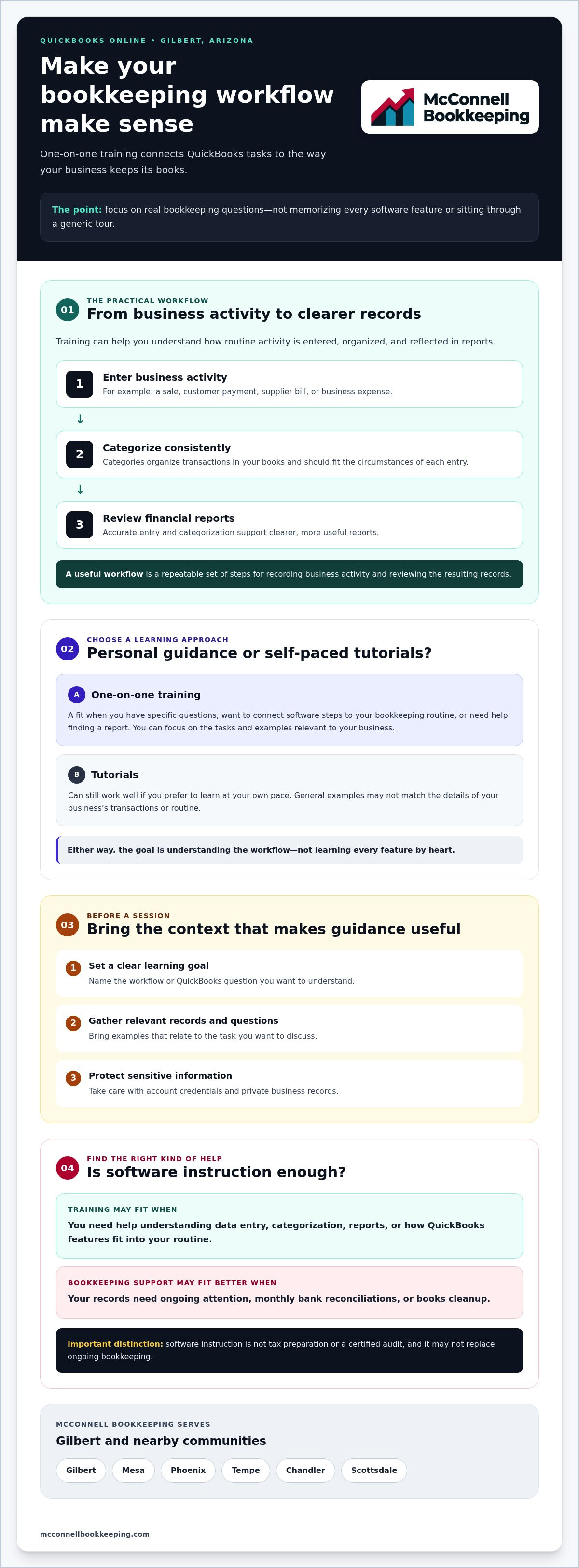
Useful training connects everyday bookkeeping tasks instead of treating every software feature as a separate lesson. You might want to understand how a sale, customer payment, supplier bill, or business expense is recorded, then see how those entries appear in your financial reports. McConnell Bookkeeping’s QuickBooks Online training focuses on data entry, reporting, and using platform features effectively. Bring the specific workflows you want to understand so the discussion can focus on relevant tasks.
A useful QuickBooks workflow is a repeatable set of steps for recording business activity and reviewing the resulting records. With a clearer routine, it can be easier to keep information organized and spot entries that need attention. The U.S. Small Business Administration explains the importance of sound financial management for small business. Consistent bookkeeping practices can support a clearer view of business activity.
Build a repeatable routine for transactions and records
Training can help you understand how source documents, such as invoices or receipts, relate to entries in QuickBooks Online. The goal is to record business activity consistently and understand how categories organize transactions in your books. Categories should reflect the circumstances of each transaction and your bookkeeping approach; there isn’t one option that fits every situation. If you’re uncertain about a particular entry, ask a qualified adviser rather than treating software instruction as tax advice.
Accurate, consistent records create a more useful foundation for routine bookkeeping. They also make it easier to review what has been entered and identify missing information or items that may need correction or follow-up. When you learn a workflow, note the steps and documents it depends on so you can repeat it the next time a similar transaction comes up.
Use QuickBooks Online reports to understand business activity
Transaction entry and report review serve different purposes. Entering and categorizing activity builds the underlying records; reports summarize those records in different ways. A profit and loss report presents income and expenses over a selected period, while a balance sheet summarizes assets, liabilities, and equity at a point in time. Learning where to find these reports and what they broadly show can help you ask better questions about your business.
Reports are only as useful as the records behind them. Missing, outdated, or incorrectly categorized transactions can affect what appears, so report review works best alongside accurate bookkeeping. Reports can improve visibility into business activity, but they are not tax filing or certified assurance. For a related perspective, see this QuickBooks training guide for Chandler business owners. If you’re considering one-on-one QuickBooks training Gilbert business owners can access, McConnell Bookkeeping’s QuickBooks Online training can help you explore instruction focused on your questions.
One-on-one QuickBooks training vs. tutorials: which learning approach fits?
The best learning option depends on what you need to do, how familiar you are with QuickBooks Online, and whether your questions are simple or connected to a wider bookkeeping routine. Self-study can work well for a clear, isolated task. Group instruction offers shared guidance, while individual help can focus more closely on your own questions. A small business bookkeeping guide can also help you understand the range of recordkeeping tasks behind the software.
When can tutorials or self-study be enough?
If you’re trying to find a setting or understand one clearly defined feature, a reliable tutorial may answer your question. Self-study lets you pause, revisit a step, and learn at your own pace. Check that the material applies to QuickBooks Online and compare its instructions with your current interface, since menus and features can change. If the tutorial resolves the issue, you may not need a more personalized approach.
When is individualized bookkeeping software guidance useful?
Individualized instruction may help when a question involves several connected steps or when follow-up questions would make learning easier. For example, you may want to understand how a software task fits into the way your business keeps records. One-on-one QuickBooks training Gilbert business owners consider can be useful when general examples leave important details unanswered. If recurring errors or unclear records persist, the issue may call for a books review or cleanup rather than more software instruction.
Choose the approach that matches the problem, not the one that sounds most comprehensive. McConnell Bookkeeping offers QuickBooks Online training and books cleanup, so you can explore QuickBooks Online support options if you’re weighing instruction against help with existing records.
How to prepare for QuickBooks training and make each session more useful
A little preparation can help make QuickBooks training more practical for your bookkeeping routine. Before your discussion, identify what you want to understand, gather relevant examples, and confirm the logistics with the provider. These steps help keep the focus on your goals without assuming training will produce a particular financial outcome.
Create a focused list of QuickBooks questions
Start with the tasks that feel unclear or take extra effort. Note recurring errors, reports you want to understand, or points where you’re unsure what to do next. For each question, record when the issue occurs and what you expected QuickBooks Online to show or do. Prioritize the most important learning goals so there is time to work through the questions that matter most.
For example, you might want to understand why a recurring entry looks different than expected or learn how to locate a report. Describe what you did and what you saw, without guessing at the cause. A focused list helps your trainer understand where you’re getting stuck and what you hope to learn.
Gather records safely and review next steps
Prepare relevant business records or examples that help explain your questions, such as a transaction or report you’re having trouble understanding. Share only what’s necessary, and remove or obscure sensitive details where possible. Don’t send passwords or account credentials. Beforehand, confirm how the training will be delivered, what QuickBooks Online access or version may be needed, and which features are within the provider’s training scope.
If records need reconciliation, software instruction may not resolve the underlying issue. McConnell Bookkeeping provides monthly bank reconciliations and serves businesses in Gilbert, Mesa, Phoenix, Tempe, Chandler, and Scottsdale. Ask whether bookkeeping support is a better fit if you’re concerned about unreconciled activity or persistent record errors.
Measure progress against your learning goals
After training, review the questions you brought and consider whether you can better explain the relevant workflow or know where to look for information. Progress means greater understanding of your learning goals, not a guaranteed improvement in business finances or error-free books. If questions remain, note them and discuss appropriate next steps with the provider.
If you’re preparing for one-on-one QuickBooks training Gilbert business owners can access, discuss your QuickBooks Online learning goals with McConnell Bookkeeping.
Explore one-on-one QuickBooks Online training with McConnell Bookkeeping in Gilbert
McConnell Bookkeeping offers expert-led QuickBooks Online training for business owners in Gilbert and nearby communities, including Mesa, Phoenix, Tempe, Chandler, and Scottsdale. The training focuses on data entry, reporting, and using platform features effectively. That gives you a practical starting point for discussing what you want to learn, whether you’re building a bookkeeping routine or trying to understand a part of QuickBooks Online that has been difficult to use.
Training is distinct from bookkeeping services. McConnell Bookkeeping also offers monthly bank reconciliations, financial statement preparation, and books cleanup. These services address bookkeeping work, while training helps you learn to use the software. If records already contain persistent inaccuracies, instruction alone may not resolve them. Ask whether a bookkeeping review or cleanup is more appropriate.
What to clarify before arranging training
Before making plans, describe the QuickBooks Online topics and business workflows you want to address. Ask whether those topics are within the firm’s training scope, what delivery format is available, and what session details or preparation requirements you should know. You can also explain your current workflow and the questions you’ve noted, without sharing passwords or unnecessary sensitive information.
These details help you decide whether training matches your needs. If your main concern is that records are inaccurate or incomplete, mention that too. A discussion can help distinguish a software-learning question from a bookkeeping issue that may call for separate support.
Take the next step toward more confident QuickBooks use
You don’t need to arrive with a perfect list of technical terms. Gilbert-area business owners can begin by describing what they currently do in QuickBooks Online, where they feel uncertain, and what they’d like to handle more confidently. McConnell Bookkeeping serves Gilbert; contact the firm directly to confirm available training arrangements and next steps.
There’s no need to commit before you understand the fit. A conversation about your questions can clarify what training may cover, what format is available, and whether your records call for a different kind of bookkeeping support. To explore one-on-one QuickBooks training Gilbert business owners can access, discuss one-on-one QuickBooks Online training with McConnell Bookkeeping.
Build a more confident QuickBooks routine, one step at a time
QuickBooks Online is easier to use when its workflows make sense for your business. Focused training can clarify everyday data entry, show how accurate records support useful reports, and give you a practical way to approach questions that generic tutorials may not address. Preparing your goals and relevant questions can also help you make the most of personalized guidance.
McConnell Bookkeeping offers expert-led QuickBooks Online training for business owners and serves Gilbert, Mesa, Phoenix, Tempe, Chandler, and Scottsdale. If you’re considering one-on-one QuickBooks training Gilbert, start by explaining what you’d like to learn and ask whether the training topics and delivery format fit your needs.
Discuss your QuickBooks Online training goals with McConnell Bookkeeping. A clear first conversation can help you identify a practical next step and move toward using QuickBooks with greater confidence.
Frequently Asked Questions
What is one-on-one QuickBooks training?
One-on-one QuickBooks training is personalized instruction that helps you understand how to use the software for your business’s bookkeeping needs. Rather than relying only on a general tutorial, you can bring questions about entering transactions, using features, or finding reports. McConnell Bookkeeping offers expert-led QuickBooks Online training focused on data entry, reporting, and platform features. Ask the firm whether the topics you want to learn are covered.
Can I get one-on-one QuickBooks Online training in Gilbert, Arizona?
McConnell Bookkeeping offers QuickBooks Online training and serves Gilbert, Mesa, Phoenix, Tempe, Chandler, and Scottsdale. Contact the firm to ask whether its current training options suit your location, what topics are covered, and how to discuss your needs. Confirming these details first can help you understand whether the service fits your situation.
Who should consider private QuickBooks Online training?
Private training may help business owners establishing a bookkeeping routine, users with specific software questions, or office managers who maintain records and want greater confidence using QuickBooks Online. It can be useful when a question involves several connected steps or general tutorials don’t address your workflow. If you need help with a simple, clearly defined feature, a reliable self-paced resource may be enough.
What should I bring to a QuickBooks training session?
Bring a short list of learning goals, questions, and examples that show where you’re getting stuck. A relevant record or report can help explain the issue, but share only what’s needed and protect sensitive business information. Don’t send passwords or account credentials. Before training, confirm with the provider what QuickBooks Online access, software version, records, or other preparation may be useful, as requirements can depend on the topics being discussed.
Can QuickBooks training fix inaccurate bookkeeping records?
Training can help you understand how to use QuickBooks Online, but it doesn’t necessarily correct inaccurate or incomplete records. If transactions are missing, entries are repeatedly incorrect, or accounts need review, ask whether bookkeeping support or books cleanup is appropriate. McConnell Bookkeeping offers books cleanup and monthly bank reconciliations as separate services. Clarifying whether you need software instruction or help reviewing existing records can guide your next step.
Does QuickBooks Online training include tax preparation?
No. QuickBooks Online training focuses on using the software, including data entry, reporting, and platform features. It isn’t tax preparation, and McConnell Bookkeeping doesn’t offer income tax return filing. Ask a qualified tax professional about tax preparation questions. Training may help you better understand your bookkeeping records, but it shouldn’t be treated as tax advice or a replacement for guidance from an appropriate tax professional.
How do I choose between QuickBooks tutorials and one-on-one training?
Choose based on the complexity of your question and how you prefer to learn. Tutorials can be useful for a single, well-defined task and let you study at your own pace; check that their instructions match your current QuickBooks Online interface. Personalized instruction may suit questions tied to your business workflow or situations where follow-up questions would help. Discuss one-on-one QuickBooks training Gilbert business owners consider with McConnell Bookkeeping to confirm whether the topics and format fit your needs.



Comments