Mastering Job Costing in QuickBooks Online: A 2026 Guide for Arizona Small Businesses

How many Arizona business owners are currently watching their hard-earned revenue vanish into a pressure gap of rising material costs and untracked labor hours? With inflation weighing on 53% of small businesses this year, guessing your margins is a risk you simply can't afford to take. It's frustrating to finish a major project only to realize your profit was thinner than a desert mirage because reimbursable expenses slipped through the cracks. Mastering job costing in QuickBooks Online changes that narrative by providing the transparency you need to protect your bottom line.
We believe that expert oversight should empower you, not overwhelm you. This guide shows you how to transform your accounting software into a powerful profitability engine that tracks every expense and labor hour with surgical precision. We'll explore how to leverage the latest 2026 AI-powered bank feeds and integrated time tracking to eliminate the stress of manual entry. By the end of this article, you'll have a clear path to gaining visibility into your project margins, allowing you to secure bank loans with accurate financial statements and confidently decide which Arizona contracts are actually worth your time.
Table of Contents
What is Job Costing and Why Does Your Business Need It?
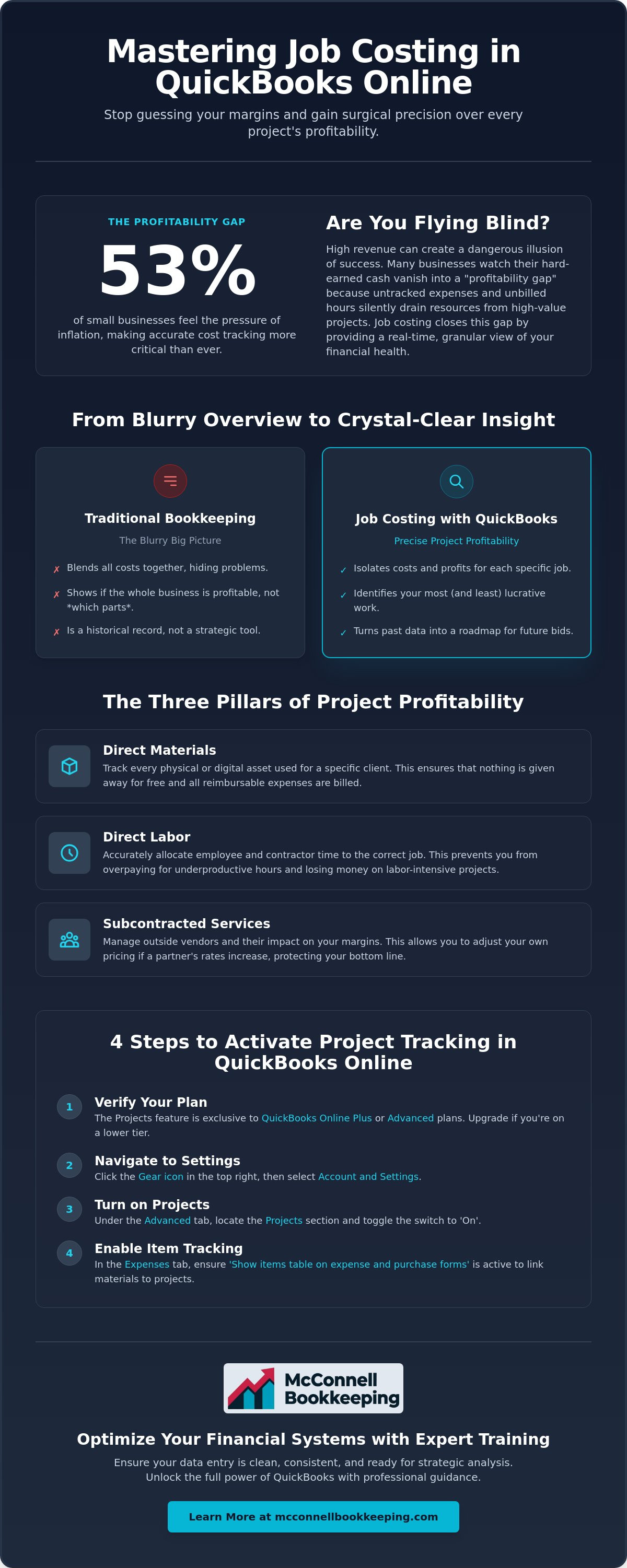
Many Arizona entrepreneurs mistake high revenue for high profit. You might see a healthy bank balance at the end of the month, but without granular visibility into individual projects, you're essentially flying blind. Job costing is the granular tracking of every dollar tied to a specific deliverable. This method allows you to see exactly where your money goes for every individual project rather than looking at your business as a single, blurry entity. With over 650,000 small businesses in Arizona, precision is your best defense against rising operational costs.
Understanding What is Job Costing? involves separating your general overhead from your direct costs. While traditional accounting tracks your rent and utilities, job costing in QuickBooks Online drills down into the specific materials, billable hours, or court filing fees associated with a single client. This level of detail is vital for Mesa-based law firms and local service providers who must ensure every billable minute contributes to the firm's growth. Proper allocation ensures that a complex litigation case or a massive HVAC overhaul doesn't quietly drain your resources.
To better understand how this looks in practice, watch this helpful video:
The "Profitability Gap" is a silent killer for growing companies. You might celebrate a 20% increase in annual revenue, yet find your bank account surprisingly empty at the end of the quarter. This happens because high-revenue businesses often lose track of "scope creep" and unbilled materials. By utilizing job costing in QuickBooks Online, you bridge this gap by seeing the real-time financial health of every active project. It transforms your books from a historical record into a strategic tool for future growth.
The Three Pillars of Project Profitability
Direct Materials: This involves tracking every physical or digital asset used for a specific client, ensuring that nothing is given away for free.
Direct Labor: Allocating employee or contractor time accurately to the correct job prevents you from overpaying for underproductive hours.
Subcontracted Services: Managing outside vendors and their impact on your margins allows you to adjust your pricing if a partner's rates increase.
Job Costing vs. Traditional Bookkeeping
Standard Profit & Loss statements often hide your most expensive mistakes by blending all costs together. While a P&L tells you if the whole business is profitable, job costing tells you which specific types of work you should stop accepting. This strategic insight informs your future bidding and pricing strategies, turning your past data into a roadmap for future success. Mastering these systems ensures that every quote you send is backed by historical reality rather than hopeful estimation.
How to Enable and Set Up Projects in QuickBooks Online
Before you can harness the power of job costing in QuickBooks Online, you must ensure your software version is up to the task. As of June 2026, the comprehensive Projects feature is exclusively available to businesses utilizing the Plus ($115/month) or Advanced ($275/month) plans. If you're currently operating on the Simple Start or Essentials versions, a quick upgrade is the first step toward gaining total financial clarity. This investment pays for itself by providing the infrastructure needed to stop revenue leaks before they impact your cash flow.
Activating your project tracking is a straightforward process that sets the stage for better oversight. Navigate to the "Gear" icon and select "Account and Settings." Under the "Advanced" tab, locate the "Projects" section and toggle the switch to "On" to reveal your new command center. You should also visit the "Expenses" tab to verify that the "Show items table on expense and purchase forms" setting is active. This specific configuration allows you to link every material purchase to a specific job, which is essential to accurately calculate business expenses and maintain healthy margins.
Projects vs. Sub-Customers: Which Should You Use?
The legacy "Sub-customer" method is officially an outdated strategy for 2026. While sub-customers were once the standard for organizing work, they lack the integrated labor cost tracking and the visual dashboard found in the Projects module. For a Mesa law firm, setting up a "Project" for a specific litigation case provides a real-time view of profitability that a simple customer record simply can't match. Utilizing Projects allows you to consolidate time, materials, and invoices into one clean interface, giving you the power to make proactive adjustments mid-job.
Configuring Your Chart of Accounts for Job Costing
A meticulous setup in your Chart of Accounts is the foundation of reliable reporting. You'll want to create specific Cost of Goods Sold (COGS) accounts for project-specific expenses, such as direct labor and job materials. Mapping your service items to these accounts ensures that your income and expenses are perfectly aligned on every report. When your structure is sound, your monthly bank reconciliations remain clean because every transaction has a designated home. If you're feeling stuck during the setup phase, our QuickBooks Online training can help you build a customized system that works for your unique business needs.
Assigning Expenses, Labor, and Materials to Specific Jobs
Precision in data entry is the heartbeat of a profitable business. Every time you record a bill, write a check, or swipe a credit card, you have the opportunity to link that expense directly to a project. By selecting the correct project from the "Customer/Project" dropdown menu, you ensure that your financial data reflects the true cost of doing business. This discipline allows you to see exactly where your capital is deployed, turning job costing in QuickBooks Online into a real-time diagnostic tool for your company's health. Understanding how to do job costing correctly is essential for avoiding the common pitfall of "lost" expenses that never make it back to the client's bill.
Don't overlook the "Billable" checkbox. Checking this box ensures that project-specific costs flow directly onto your next client invoice, protecting you from the "leakage" that often erodes service-provider margins. For Arizona law firms, this workflow is critical for managing case costs. Whether you're paying for expert witnesses or court filing fees, tagging these expenses to a specific matter ensures your trust accounting remains pristine and your reimbursements are accurate. As of May 2026, QuickBooks Time is fully integrated into the platform, meaning your team's clocked hours sync directly to your projects without the need for external bridges or manual exports.
Tracking Labor Costs and Payroll Allocation
True profitability requires you to look beyond simple hourly wages. You must account for your "Labor Burden," which is the total cost of an employee including taxes, workers' compensation, and benefits. To streamline this complex calculation, a professional QuickBooks payroll setup service Mesa can configure your system to allocate these costs automatically. This setup allows you to assign hourly wages to specific projects without doubling your administrative workload, providing a transparent view of your actual labor investment.
Managing Reimbursable Expenses
Recording expenses paid on behalf of a client is only half the battle; you must also ensure they're invoiced promptly. It's easy for small project costs to slip through the cracks, but these minor omissions can add up to thousands of dollars in lost revenue over a year. We recommend implementing a strict digital receipt management policy using the QuickBooks mobile app. Uploading receipts immediately and tagging them to a project creates a digital paper trail that supports project audits and gives you the confidence to defend your billables if a client ever questions a charge.
Analyzing Your Data: Key QuickBooks Reports for Profitability
Data entry provides the raw materials for your books, but interpretation provides the strategic insight. Once you've mastered the discipline of tagging transactions, the real magic happens within the reporting suite. For many Arizona business owners, the Project Profitability report is the ultimate scorecard for your business strategy. This report compares your actual costs against your initial estimates, revealing whether your pricing model is sustainable or needs a radical shift. Effective job costing in QuickBooks Online ensures that you're not just staying busy, but actually building equity in your company.
Finding "hidden money" often starts with the Unbilled Time and Expenses report. This tool highlights every billable item that hasn't yet made it onto a client invoice. It's common for small costs to linger here for months, quietly eroding your cash flow. By reviewing this weekly, you ensure your records reflect the true value of work performed. If you're planning to apply for a business loan in Phoenix or Mesa, these clean, accurate reports prove to lenders that you have a firm grip on your operational efficiency. Our team provides professional financial statement preparation to help you present these numbers with absolute confidence.
Interpreting the Project Dashboard
The dashboard offers a visual representation of your project's health through intuitive bar charts for income, costs, and profit. While a high profit margin is encouraging, you must also monitor your cash flow. A project might show a paper profit while simultaneously draining your bank account because of delayed billing or high upfront material costs. Spotting these red flags early allows you to renegotiate terms or adjust your spending before a liquidity crisis occurs.
Case Costing Reports for Law Firms
Arizona legal practices require a more nuanced approach to ensure IOLTA and trust accounting don't muddy their profitability data. Case-specific reporting allows you to isolate client-funded costs from your firm's operating expenses. This clarity is essential for maintaining compliance with state bar regulations while still understanding which practice areas are your most lucrative. Utilizing these advanced filters ensures your overhead doesn't swallow the margins on your most complex litigation matters.
Finally, the Project Expense Totals report identifies which vendors are eating your profits. If you notice a specific supplier's costs are creeping up across multiple jobs, you have the data needed to negotiate better rates or find a more cost-effective alternative. This level of transparency transforms your bookkeeping from a monthly chore into a powerful competitive advantage.
Optimizing Your Financial Systems with Expert QuickBooks Training
Software setup represents only 50% of the battle for financial clarity. You can toggle every switch and enable every feature mentioned in the previous sections, but if your data entry is inconsistent, your reports will remain unreliable. The "garbage in, garbage out" principle is particularly dangerous when managing job costing in QuickBooks Online. Without a disciplined process for tagging labor and materials, you risk making major business decisions based on flawed data. Professional training bridges the gap between simply owning a powerful tool and actually using it to drive sustainable growth.
Transitioning from a DIY approach to a strategic partnership changes how you view your numbers. Instead of spending your weekends fighting with unmapped accounts or reconciling old transactions, you can focus on high-level strategy. Meticulous training empowers you to take control of your financial destiny. It moves you from a state of administrative stress to a state of informed confidence. When your systems are optimized, your books become a proactive resource rather than a reactive chore. This shift allows you to lead your business with a sense of reliability and calm.
Personalized QuickBooks Training in Chandler and Phoenix
Generic online tutorials often fail to address the specific nuances of your local industry. Whether you're managing a growing dental practice or a busy law firm, your workflow needs to be as unique as your business model. We provide QuickBooks training for business owners that focuses on your actual data and real-world scenarios. This one-on-one approach ensures that your setup supports your specific goals, allowing you to master job costing in QuickBooks Online without the frustration of trial and error. Customizing your workflow saves hours of administrative time every week.
When to Bring in a QuickBooks ProAdvisor
Recognizing the signs that your books need a professional cleanup is a hallmark of a strategic business owner. If you find yourself unable to explain your project margins or if your accounts payable are consistently messy, it's time to seek expert oversight. A ProAdvisor acts as a diligent guardian and a strategic mentor, helping you scale from basic expense tracking to advanced financial forecasting. Learning how to find a QuickBooks ProAdvisor is a critical step for any entrepreneur ready to move beyond "busy work" and into true profitability. Expert guidance ensures your financial statements are bank-ready and your decision-making is rooted in reality.
Secure Your Profitability with Financial Precision
Mastering your project margins is the definitive path to transforming your small business from a collection of tasks into a high-performance profitability engine. By moving beyond basic bookkeeping and adopting rigorous job costing in QuickBooks Online, you gain the transparency needed to protect your bottom line against rising operational costs. You have the tools to identify your most lucrative work; now you simply need the disciplined systems to capture every billable hour and material expense with absolute accuracy.
We're here to serve as your strategic mentor in this journey. As a Certified QuickBooks ProAdvisor specializing in the unique demands of legal and dental bookkeeping, we provide the expert oversight you need to lead with confidence. We offer dedicated local support for business owners in Mesa and Phoenix who are ready to move from administrative stress to informed growth. Empower your business with expert QuickBooks Online Training today to ensure your financial statements are bank-ready and your future is secure. Your success is our mission, and we're invested in helping your Arizona business thrive.
Frequently Asked Questions
Does QuickBooks Online Essentials have job costing?
QuickBooks Online Essentials does not include the full Projects feature required for comprehensive job costing. You must use the Plus or Advanced versions to access the dedicated Projects dashboard. Upgrading to these tiers allows you to see real-time profitability and track labor costs with the precision necessary for making informed business decisions in the competitive Arizona market.
How do I track labor costs for a specific job in QuickBooks Online?
You can track labor costs by using the integrated QuickBooks Time feature to clock hours directly against a project. Once employees or contractors log their time, the software automatically calculates the cost based on their hourly rates. This seamless integration ensures that your job costing in QuickBooks Online remains accurate without the need for manual data entry or complex external spreadsheets.
What is the difference between a project and a customer in QuickBooks?
A customer is the entity that pays you, while a project is a specific piece of work tied to that customer. For instance, a law firm might have one client but several different legal matters. Using projects allows you to isolate the financial performance of each individual case rather than blending all revenue and expenses into one generic customer record.
Can I see project profitability for previous years in QuickBooks?
Yes, you can view project profitability for previous years by adjusting the date range on your Project Profitability reports. As long as you consistently tagged your expenses and labor hours to the correct projects in the past, the software will generate a historical view of your margins. This data is invaluable when you're preparing financial statements for bank loans or analyzing long-term growth.
Is job costing the same as project management?
No, these are distinct functions. Job costing is a financial process focused on tracking income and expenses to determine profitability. Project management involves the operational side of the work, such as scheduling and deadlines. While they work together, job costing in QuickBooks Online specifically guards your firm's financial health rather than its daily schedule.
How do I handle overhead costs in QuickBooks job costing?
Overhead costs like rent and utilities are typically not assigned to specific projects because they aren't directly tied to a single job. Instead, you should focus on direct costs like materials and labor within your project tracking. If you need to account for overhead, you might apply a labor burden or a percentage based allocation, though this often happens outside of the standard project dashboard.
What happens if I forget to mark an expense as billable in a project?
If you forget to mark an expense as billable, the cost will still be recorded against the project, but it won't automatically prompt you to add it to the client's invoice. You'll need to go back into the specific bill or expense transaction and check the "Billable" box manually. This ensures you're reimbursed for every dollar spent on behalf of your clients, preventing silent revenue leaks.
How do I fix a transaction assigned to the wrong project?
Fixing a transaction assigned to the wrong project is a simple administrative task. Open the incorrect transaction, locate the "Customer/Project" column, and select the correct project from the dropdown menu. Once you save the changes, your reports will update instantly to reflect the correct data. Keeping your books clean ensures your strategic decisions are always based on accurate information.


Comments