Is My QuickBooks Set Up Correctly? A Small-Business Checklist

What if your QuickBooks file looks tidy but still tells the wrong story about your business? If you’ve asked, “is my QuickBooks set up correctly,” look beyond the dashboard. A report that doesn’t match your bank balance or day-to-day activity may point to setup issues, unreconciled transactions, or older bookkeeping errors. For small businesses in Mesa, Phoenix, Gilbert, Tempe, Chandler, and Scottsdale, reliable records make it easier to understand what’s happening in the business.
It’s reasonable to feel cautious about changing settings or correcting past entries. Start by reviewing the records and reports that show whether your books are dependable, without making changes first. This checklist will help you spot warning signs, understand what accurate records should show, and choose what to address next.
You’ll review key setup details, compare account balances with bank statements, and check reports for inconsistencies. You’ll also learn when QuickBooks Online training can help you manage the software, and when books cleanup or regular reconciliations may help resolve recordkeeping issues. Accurate bookkeeping depends on reconciled records and useful reports, not settings alone.
Table of Contents
Is Your QuickBooks Setup Correct? Start With These Core Checks
A sound QuickBooks setup organizes business activity so transactions are recorded consistently and reports can support practical decisions. It should help you see where money comes from, where it goes, and what the business owns or owes. But a complete-looking settings screen can’t show whether every transaction has been entered, categorized, and reviewed accurately.
If you’re asking, “is my QuickBooks set up correctly,” use this checklist as a review aid, not as a formal audit or tax review. Look for patterns and questions to investigate rather than trying to diagnose every discrepancy at a glance. Initial configuration gives your books a structure; ongoing bookkeeping keeps records accurate as your business changes.
For background on the software and its versions, see this overview of QuickBooks accounting software. To see a setup walkthrough, watch this video:
What a sound QuickBooks Online setup should make possible
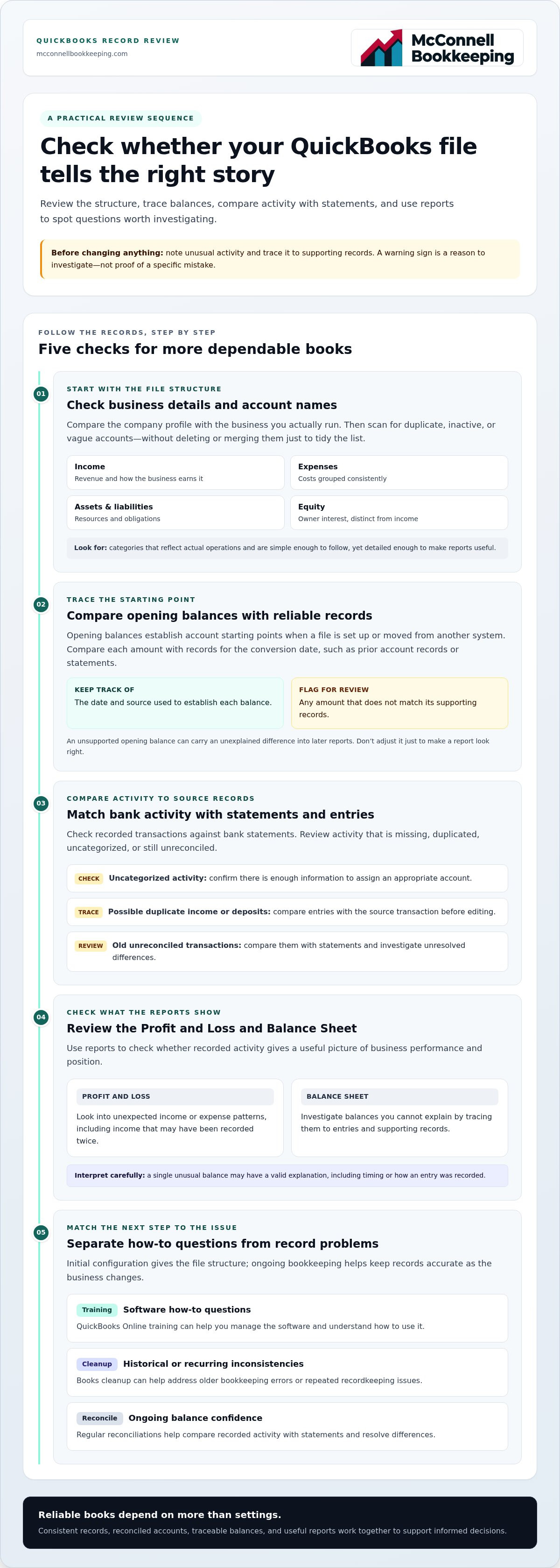
Organized accounts give each transaction a meaningful place. Income accounts distinguish how your business earns revenue; expense accounts group costs; asset and liability accounts track resources and obligations. Categories should reflect your actual operations and reporting needs, not an overly complicated template or a separate account for every transaction.
This structure supports consistent records. For example, recording software subscriptions under the same expense category makes it easier to compare costs across periods. When similar transactions are categorized consistently, financial reports provide a clearer view of performance and position. Your chart of accounts should be simple enough to follow and detailed enough to make reports useful.
Quick warning signs worth investigating
A warning sign is a reason to investigate, not proof of a particular mistake. Review transactions left uncategorized, balances you can’t explain, or income that appears to have been recorded twice. A duplicated deposit, for instance, may affect reported revenue. Trace the entries and supporting records before changing anything.
Uncategorized activity: Check whether you have enough information to assign the transaction to an appropriate account.
Unexplained balances: Trace the amount to its underlying entries and supporting records.
Possible duplicate income: Compare the entries with the source transaction before removing or editing anything.
Old unreconciled transactions: Compare them with statements. Unresolved differences can reduce confidence in account balances and reports.
One unusual balance may have a valid explanation, such as timing or how an entry was recorded. Note what you find and gather related records before making changes, especially when the activity is from an earlier period. A careful review helps you identify what needs attention without rushing to correct a single unexpected figure.
Check Your QuickBooks Accounts, Opening Balances, and Business Details
Next, check whether the structure behind your records reflects the business you actually run. Compare the company profile in QuickBooks with your business details and activities, then review the accounts and starting balances that shape your reports. These checks can show whether the file has a useful foundation before you investigate individual transactions.
Review the chart of accounts without overcomplicating it
The chart of accounts groups activity so you can understand it in reports. Income accounts track revenue, expense accounts track costs, asset accounts record resources the business owns, liability accounts track obligations, and equity accounts reflect the owner’s interest. Names and categories should make it easy to recognize where common business activity belongs.
Scan for duplicate, inactive, or vague names, such as two accounts that appear to track the same type of income. Make a note of questions, but don’t delete or merge accounts just to tidy the list. Existing transactions may rely on those accounts, and changing them without understanding their history can affect how past activity appears.
Income: Can you tell what kind of business revenue each account represents?
Expenses: Are recurring costs grouped consistently under understandable names?
Assets and liabilities: Can you identify accounts for resources and obligations relevant to your business?
Equity: Are owner-related accounts distinguishable from ordinary income and expenses?
Check opening balances and business setup details
Opening balances establish the starting point for accounts when you begin using a QuickBooks file or move from another system. Compare each starting amount with reliable records for the conversion date, such as prior account records or statements. Keep track of the date and source so you can trace how the balance was established.
An opening balance without traceable support can carry an unexplained difference into later reports. If an amount doesn’t match the records for that date, flag it for investigation rather than adjusting it just to make the reports look right.
Review the company profile and settings that affect how the file represents your business. Check that the business name and other company details are current. Consider whether the fiscal-year and accounting-method settings align with your established reporting needs. There isn’t one setting that suits every business, so avoid changing these options based only on a generic recommendation. If you need practical help using QuickBooks Online, QuickBooks training for business owners can help you build confidence with the software.
Before making structural changes, note the account, balance, or setting you’re unsure about and gather its supporting records. This gives you a clear starting point for review. If account history is difficult to follow or balances lack support, QuickBooks bookkeeping support can help you work toward clearer, more dependable records.
Test Bank Feeds, Transaction Categories, and Reconciliation Results
A connected bank feed can bring activity into QuickBooks, but a connection alone doesn’t confirm that entries are complete, categorized correctly, or reconciled. Compare imported transactions with the bank or card statement for the same period. Check that each entry belongs in the correct account and appears only once. This is a practical way to test whether your digital record matches an independent source.
Reconciliation means comparing recorded account activity with an independent account statement to identify and resolve differences. It checks more than whether a bank feed is working. It helps show whether the QuickBooks balance agrees with the statement after accounting for the transactions recorded for that period.
Review bank-feed activity and transaction categories
Choose a statement period and compare its deposits, withdrawals, and fees with the transactions recorded in QuickBooks. Confirm that imported entries belong to the intended business bank or card account. Look for activity entered once manually and again through the feed, or an item on the statement that’s missing from the books. Review uncategorized and recurring transactions so similar activity receives consistent treatment.
For an expense involving both business and personal activity, identify and document the business portion rather than assuming the full amount belongs in the books as a business transaction. Bookkeeping categorization doesn’t determine whether an expense is deductible. Keep that question separate from this records check.
Use reconciliations to test whether balances hold together
Review completed reconciliation periods against their corresponding bank or card statements. Check that the ending balance and statement date line up, and examine any difference rather than relying only on a completed status. Old outstanding items, repeated adjustments, or amounts that keep carrying forward deserve attention. They may point to timing or recording issues, but investigate each one before deciding what it means.
A consistent reconciliation history is one useful indicator when asking “is my QuickBooks set up correctly,” but it doesn’t guarantee every category or report is right. Keep notes on unexplained differences and avoid unsupported adjustments just to force a balance. McConnell Bookkeeping provides monthly bank reconciliations to help small businesses maintain regular account checks and review ongoing records with greater clarity.
Use Reports and a Repeatable Checklist to Find Setup Problems
Reports help you test whether your records make sense together. If you’re asking, “is my QuickBooks set up correctly,” review the Profit and Loss and Balance Sheet using a consistent date range and accounting basis. Compare the results with what you know about the business, then investigate differences instead of assuming a report is right or wrong at first glance. Business owners in Mesa, Phoenix, Gilbert, Tempe, Chandler, and Scottsdale can use the same review process.
Compare core reports with what you know about the business
The Profit and Loss summarizes income and expenses over a period. The Balance Sheet shows assets, liabilities, and equity at a point in time. Together, they can highlight activity that deserves follow-up, but they don’t by themselves prove tax treatment or compliance. Use this sequence to make your review repeatable:
Set the period and basis. Choose the dates you want to review and note whether the reports use cash or accrual accounting. Use the same choices each time you compare periods.
Scan the Profit and Loss. Check whether income and expenses appear in sensible periods and account groupings. Follow up on an unexpected spike, drop, or negative amount by examining the underlying activity.
Compare with business activity. Consider whether the report broadly reflects known sales, recurring costs, and meaningful changes during the period. A mismatch is a question to investigate, not a diagnosis.
Review the Balance Sheet. Look for assets, liabilities, and equity balances you can connect to records or account activity. An unexpected negative balance may have an explanation, so trace its details before drawing conclusions.
Compare periods consistently. If a figure changes sharply between periods, confirm the dates and basis match before investigating the transactions behind the change.
Prioritize corrections and keep a review trail
A clear note can prevent the same question from resurfacing. For each discrepancy, record the affected account and period, what you observed, which supporting document you reviewed, and the next action. For example, note that an expense changed sharply in a particular month and identify the statement or transaction detail you’ll use to investigate it.
Don’t rush to edit entries in a closed period. First understand how a change could affect later balances and reports, and document the issue and its resolution. If a correction reaches beyond routine bookkeeping, seek appropriate professional guidance rather than treating this checklist as a tax review or audit.
Use the same brief review each time: select a consistent period and basis, scan both reports, note unexpected changes, and track unresolved questions. This makes recurring inconsistencies easier to spot. McConnell Bookkeeping prepares financial statements and helps business owners review their bookkeeping records. Get support with your financial statements.
When QuickBooks Training or Books Cleanup Can Help
A checklist can show where questions remain, but the right next step depends on what you find. If your records are generally consistent and you’re unsure how to handle a recurring task, training may be a good fit. If earlier transactions are incomplete, duplicated, or difficult to trace, books cleanup can address the underlying history. Some businesses benefit from both: cleanup to organize past records, followed by training to support a consistent process going forward.
Choose training when the system works but the workflow feels unclear
QuickBooks Online training can help owners build confidence with everyday tasks, such as entering transactions, reviewing categories, finding and running reports, and using relevant software features. If you’re unsure how to record a routine payment or locate a report, guided practice can help you follow a clear process next time. Consistent workflows make it easier to keep new records organized. Training clarifies how to use the system, but doesn’t by itself correct historical accounting errors.
Training can be especially helpful when a question is isolated or different people handle similar transactions in different ways. Identify the task that causes uncertainty, learn a repeatable approach, and apply it to future activity. This helps prevent confusion from becoming a recurring pattern.
Consider cleanup when records contain unresolved history
Books cleanup focuses on reviewing and organizing past bookkeeping records. It may be appropriate when prior transactions were categorized inconsistently, account balances are difficult to explain, or earlier periods contain unresolved entries. Cleanup starts by understanding what the existing records show and tracing issues to available supporting information, rather than making changes simply to create a cleaner-looking report.
After historical issues are addressed, regular oversight helps keep records useful. Monthly bank reconciliations compare account activity with statements and help identify differences that need attention. Financial statement preparation organizes the resulting records into reports that support a clearer view of business activity. Together, these services give owners a more consistent basis for reviewing their books over time, though they don’t replace tax or audit services.
If you’re still asking, “is my QuickBooks set up correctly,” consider whether you need to learn a workflow, resolve past inconsistencies, or maintain reliable records on an ongoing basis. McConnell Bookkeeping supports small businesses with QuickBooks Online training, books cleanup, monthly reconciliations, and financial statement preparation. Explore bookkeeping support to choose a practical next step toward a more confident QuickBooks process.
Make Your Next QuickBooks Check Count
You don’t need to solve every bookkeeping question at once. Choose the issue that most affects your confidence, gather the records behind it, and decide whether you need help with your workflow or with untangling past entries. That focused next step can turn “is my QuickBooks set up correctly” from a lingering concern into a practical plan.
McConnell Bookkeeping helps business owners build confidence through QuickBooks Online training, address historical accounting errors with books cleanup, and maintain oversight through monthly bank reconciliations and financial statement preparation. The goal is clearer records you can use to understand your business and make informed decisions.
Explore bookkeeping and QuickBooks support and take the next step toward a more confident bookkeeping process.
Frequently Asked Questions
Can I set up QuickBooks Online myself?
Yes, you can set up QuickBooks Online yourself, particularly if your business activities and reporting needs are straightforward and you’re comfortable learning bookkeeping workflows. Start by listing how you earn revenue, pay expenses, and manage customer invoices, then build a setup that reflects those activities. If you’re unsure how to enter transactions or interpret reports, QuickBooks Online training can help you use the software more confidently. Not every business needs the same configuration.
How often should I review whether my QuickBooks setup is working correctly?
A monthly review is a practical cadence for catching issues before they become harder to trace. After reviewing a month’s activity, note unusual report changes, unfamiliar account balances, or transactions you couldn’t confidently classify. Revisit your setup when the business changes, such as adding a bank account, introducing a new revenue stream, or changing how you handle customer payments. Regular attention helps you spot when your workflow no longer fits.
What does an unexplained balance in QuickBooks mean?
An unexplained balance means you need more context, not that a particular error has occurred. First identify the account type and report date. A liability account, for example, can show an amount owed, while an asset account may reflect a resource the business owns. Review the account’s transaction history and supporting records to understand how the balance formed before deciding whether it needs correction.
Can I change my QuickBooks chart of accounts after setup?
Yes, you can adjust the chart of accounts as your business evolves, but consider how a change will affect past and future reporting. Renaming an account may make its purpose clearer, while changing its classification can alter how activity appears on reports. Before editing, save or record the current account list and note the reason for each change. That reference can help you interpret comparisons across periods after the chart is updated.
Why do my QuickBooks reports not match my bank balance?
They may be showing different things. A Profit and Loss report summarizes income and expenses over a selected period, while a bank balance reflects one account at a particular time. Even the Balance Sheet’s cash figure may differ from the bank’s displayed balance because of timing, account selection, or the report date. Confirm you’re comparing the same account and date, then review the transactions that explain any remaining difference.
Does QuickBooks setup include tax filing or an audit?
No. Setting up or using QuickBooks doesn’t itself file an income tax return or perform a certified audit. The software helps organize financial records and produce reports, while tax filing and audit or attestation work are separate professional services. McConnell Bookkeeping focuses on bookkeeping support, including records cleanup, reconciliations, and financial statement preparation. Those services can help organize your books, but they aren’t a substitute for tax or audit services.
When should a small business consider QuickBooks training or books cleanup?
Choose training if you understand your records but feel uncertain about software tasks, such as recording customer payments or customizing reports. Consider cleanup if repeated past errors, inconsistent classifications, or gaps in older records make current bookkeeping difficult to follow. McConnell Bookkeeping supports small businesses in Mesa, Phoenix, Gilbert, Tempe, Chandler, and Scottsdale with QuickBooks Online training and books cleanup, helping owners choose a practical next step based on the issue they’re facing.



Comments