Bank Reconciliation Best Practices: A Guide for Small Business Owners in 2026

Only 29% of small businesses currently leverage AI for their financial management. This means the majority of owners are still battling the anxiety of unexplained discrepancies in QuickBooks while trying to manage their daily operations. You likely started your company to build something meaningful, not to lose sleep over whether your cash flow is accurate or if you've missed a critical tax deduction. It's frustrating when the numbers don't align, but it's even more stressful when you don't have a clear path to fix them.
Mastering bank reconciliation best practices is the most effective way to regain control and turn your financial data into a tool for growth. We'll show you how to establish a repeatable monthly workflow that delivers clean, tax-ready books and the confidence you need to make high-level decisions. This guide explores the essential habits, updated 2026 software features, and strategic oversight required to keep your business financials transparent and secure.
Key Takeaways
Understand why relying solely on your QuickBooks bank feed creates financial blind spots and how true reconciliation provides a definitive source of truth.
Implement bank reconciliation best practices by maintaining a strict monthly schedule and digital paper trail to ensure your books are always audit-ready.
Learn to identify and resolve common QuickBooks discrepancies, such as beginning balance mismatches and duplicate entries, before they skew your financial reports.
Establish a repeatable monthly workflow that starts with a comprehensive bank feed cleanup to streamline the final matching process across all accounts.
Evaluate the opportunity cost of DIY bookkeeping to determine when delegating complex reconciliations can liberate your time for higher-level strategic growth.
Table of Contents
What is Bank Reconciliation and Why Does it Matter for Your Business?
Financial integrity begins with a clear understanding of where your money actually resides. At its core, bank reconciliation is the process of matching your business's internal accounting records against the transactions listed on your bank statement. This practice ensures that every dollar leaving or entering your accounts is accounted for, creating a transparent trail that supports your business's long-term health.
Many owners mistakenly believe that the automated bank feed in QuickBooks Online replaces the need for a formal review. While automation captures data, it doesn't verify the accuracy of the categorization or catch missing entries. Implementing bank reconciliation best practices allows you to catch these gaps early, preventing small errors from snowballing into significant financial headaches.
To better understand this concept and see how it works in practice, watch this helpful video:
In 2026, the speed of business demands more than just occasional oversight. Real-time data feeds are standard, yet they often create a false sense of security. Adhering to bank reconciliation best practices is critical because it forces a pause to verify that your digital records reflect reality. Neglecting this step often results in unrecorded expenses, which directly translates to missed tax deductions and a higher, unnecessary tax bill at year-end.
The Difference Between Cash Balance and Book Balance
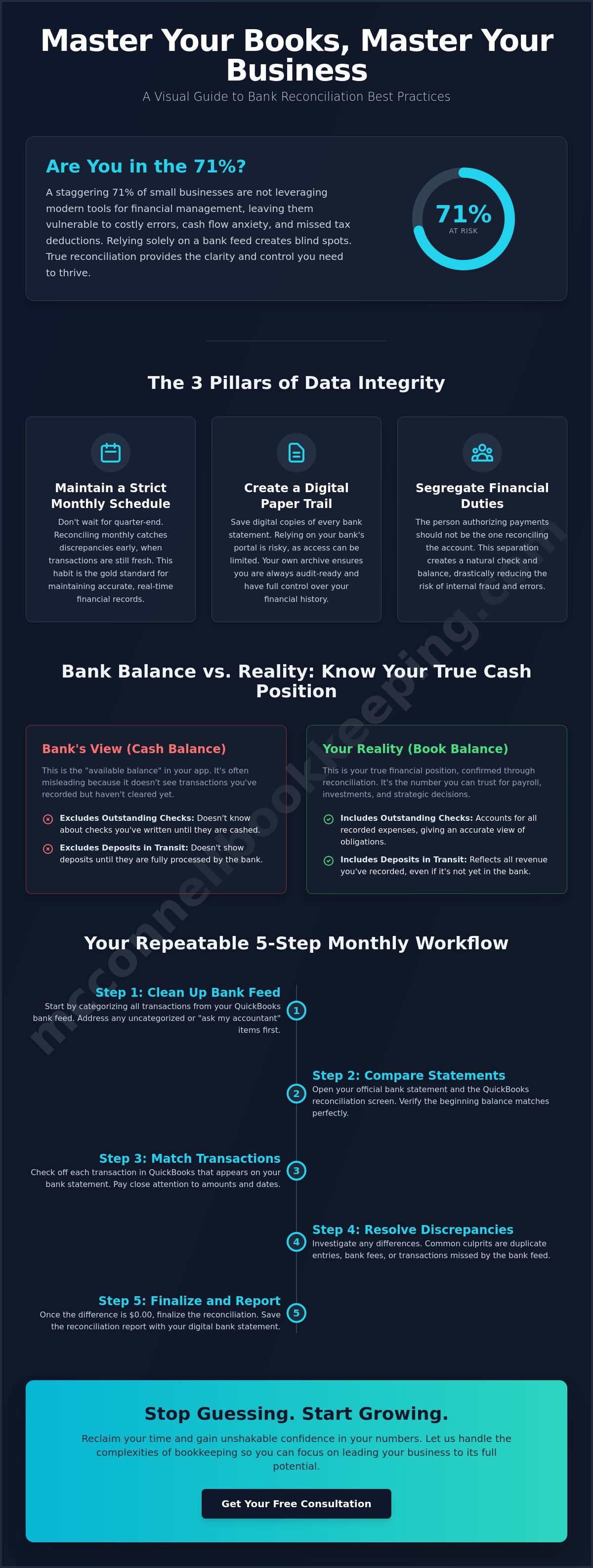
Your bank app shows the "available balance," but this figure is often misleading for strategic planning. It doesn't account for "outstanding checks" you've written that haven't cleared or "deposits in transit" that aren't yet visible to the bank. Reconciling your books allows you to identify these timing differences, giving you a precise "book balance" that you can actually trust for payroll and investment decisions. This clarity eliminates the guesswork that often leads to cash flow anxiety.
Fraud Detection and Error Prevention
Regular reconciliation serves as a diligent guardian for your assets. By meticulously comparing records, you can spot unauthorized charges or bank errors before they drain your cash flow. This level of detail-oriented management does more than protect your current funds; it establishes a reputation for reliability with lenders and partners who value impeccable financial records. Maintaining clean books is a proactive way to demonstrate that your business is in safe, capable hands, providing the relief and confidence you need to focus on growth.
Core Bank Reconciliation Best Practices for Data Integrity
Consistency serves as the foundation of financial transparency. While it's tempting to push bookkeeping tasks to the end of the quarter, a strict monthly schedule is the gold standard for maintaining accurate records. This habit ensures that discrepancies are caught while the transactions are still fresh in your mind. If you're looking for a structured approach, this in-depth guide to bank reconciliation provides a technical breakdown of the necessary steps to align your accounts perfectly.
Adopting bank reconciliation best practices includes establishing a rigorous "Paper Trail" rule. You should save digital copies of every bank statement for each reconciled period. Relying on the bank's online portal to store history is risky, as many institutions only provide access to the last few years of data. Downloading and archiving these statements within your own systems guarantees that you're always prepared for internal reviews or external inquiries. For those who find the technical setup overwhelming, investing in QuickBooks Online training can empower you to manage these digital archives with ease.
Segregation of duties is another critical pillar of data integrity. In a small business, the person responsible for writing checks or authorizing payments shouldn't be the same person who reconciles the bank account. This separation acts as a natural check and balance, reducing the risk of internal errors or unauthorized transactions. Even for micro-businesses in Phoenix, having a second pair of eyes on the books provides the relief that comes from expert oversight.
Frequency and Timing for Optimal Results
Timing is everything when it comes to financial clarity. We recommend setting a recurring "Reconciliation Day" within the first five days of every new month. This proactive approach ensures your data is ready for your monthly financial review for business. High-volume Mesa retail businesses may even benefit from weekly "soft" reconciliations. Reviewing transactions weekly allows you to spot bank feed errors or missing receipts before they become part of a larger month-end problem.
Standardizing Your Documentation
Organization creates efficiency. Use consistent naming conventions for your digital files, such as "YYYY-MM_BankName_Statement," to ensure easy retrieval during tax season. Storing these records in a secure, cloud-based environment keeps your Phoenix and Mesa teams aligned and ensures that everyone is working from a single source of truth. Regularly reviewing your "Uncleared" list is equally vital. If a transaction hasn't hit the bank after 90 days, it's time to investigate whether a check was lost or a deposit was recorded in error. If your current books feel cluttered with these old entries, a professional books cleanup can restore the accuracy of your financial history.
Troubleshooting QuickBooks Online Reconciliation Discrepancies
Nothing disrupts a productive afternoon quite like a QuickBooks alert stating your beginning balance is off. This common hurdle often stems from accidental changes to transactions you've already verified. Maintaining bank reconciliation best practices requires a proactive approach to these errors to ensure your financial data remains a reliable foundation for decision-making. By identifying the root cause of a mismatch quickly, you restore the integrity of your reports and the confidence in your numbers.
One primary culprit for discrepancies is the urge to "Void" or delete a check from a previous month. While it might seem like a quick fix for an uncashed payment, voiding a transaction in a closed period alters the historical balance. This action forces the software out of alignment, creating a discrepancy that carries forward. Instead of deleting, it's better to record an adjusting entry in the current period to preserve the history of your reconciled books. If your ledger has become cluttered with these historical errors, a professional books cleanup can help you reset and start fresh.
Personal expenses accidentally paid from a business account also create confusion during the month-end close. When these transactions appear in your bank feed, you shouldn't delete them. Instead, categorize them as an "Owner's Draw" or "Equity" account. This keeps your bank balance accurate without inflating your business expenses, ensuring your tax-ready books remain clean and transparent.
Fixing the Common 'Beginning Balance' Error
Locating the source of a mismatch is simpler than it appears. Start by running the Reconciliation Discrepancy Report, which highlights any changes made to transactions since your last successful close. If that doesn't reveal the answer, use the "Audit History" tool within the transaction itself to see exactly who changed what and when. A beginning balance mismatch is almost always a retrospective change to a reconciled transaction. By reversing these changes or restoring the original values, you can quickly bring your ledger back into harmony.
Managing Bank Feed 'Ghost' Transactions
Automation sometimes creates "ghost" transactions that lead to double-counted expenses. This happens when you manually enter a bill or check and then "Add" the same transaction from the bank feed instead of using the "Match" function. If you see two entries for the same purchase, the "Match vs. Add" dilemma is likely the cause. You should only use "Add" for new transactions that haven't been recorded yet. If a duplicate slips through, you can safely "Exclude" the transaction from the bank feed to maintain your data integrity and keep your cash flow accuracy high.
A Step-by-Step Monthly Reconciliation Workflow
A structured workflow transforms a chaotic pile of receipts into a strategic asset. Efficiency begins with preparation. You should gather all statements for the period, including checking accounts, savings, and credit cards. Having these documents ready allows for a focused, uninterrupted session that minimizes errors. This proactive preparation is one of the most effective bank reconciliation best practices for maintaining a steady business rhythm.
Before you hit the reconcile button, perform a "Pre-Rec" cleanup. This involves clearing your bank feed and ensuring every transaction is either matched to an existing entry or added to the ledger. Entering the "Statement Ending Balance" and "Ending Date" with precision is the next vital step. Even a small typo here will result in a discrepancy that masks real issues. By dedicating time to this methodical process, you ensure your bank reconciliation best practices deliver the clarity needed for growth.
The Pre-Reconciliation Checklist
Success in reconciliation depends on the quality of your data entry throughout the month. Ensure all accounts receivable services Mesa entries are matched to their corresponding deposits. You must also record any interest earned or bank fees before starting the official reconciliation. Finally, verify that all transfers between your accounts have both an "in" and an "out" entry. If you find your monthly workflow is becoming unmanageable, our Monthly Bank Reconciliations service can handle the heavy lifting for you.
Investigating the 'Difference' Column
Your ultimate goal is a "Zero Difference" result. Even a tiny $0.05 discrepancy warrants investigation, as it could be the net result of two much larger, offsetting errors. Common culprits include transposed numbers, such as recording $89 as $98. If your difference is divisible by nine, you likely have a transposition error. While posting an adjustment is a last resort, it should be rare and well-documented. Once you reach zero, finalize and lock the period to prevent accidental changes to your clean books. This final step protects your data integrity and ensures your financials are ready for tax season or a loan application.
When to Transition from DIY to Professional Bookkeeping
Deciding to delegate your financial oversight is a pivotal moment in your business's evolution. As your company expands, the time you once spent on manual data entry becomes increasingly valuable for high-level sales and strategic planning. Recognizing this opportunity cost is essential for long-term success. By outsourcing your monthly bank reconciliations, you liberate yourself from administrative weight and ensure that your focus remains on the growth activities only you can lead.
The complexity threshold often arrives when your business adds multiple bank accounts, credit cards, or payroll management into the mix. These additional layers increase the risk of errors that can stay hidden for months without professional intervention. Adhering to bank reconciliation best practices becomes more difficult as transaction volumes rise, making DIY efforts a risky gamble with your data integrity. A professional books cleanup can rescue a year of neglected reconciliations, effectively restoring your financial history and providing a fresh start for the future.
Beyond the technical tasks, partnering with a professional provides the value of a strategic mentor. We look past the raw numbers to help you understand the story your financials are telling. This expert oversight acts as a diligent guardian for your cash flow, identifying trends and opportunities that might be missed during a hurried DIY session. Transitioning to professional support moves you from a state of reactive troubleshooting to a state of informed confidence.
Signs Your Mesa Business is Outgrowing DIY Bookkeeping
You are more than 60 days behind on your bank reconciliations and find it difficult to catch up.
Your CPA expresses frustration or complains about the state of your books every tax season, leading to higher accounting fees.
You feel a sense of uncertainty about your actual profit margins despite looking at your QuickBooks dashboard daily.
The McConnell Bookkeeping Advantage
Our monthly bank reconciliation service provides the clarity and calm that Phoenix owners need to lead effectively. We handle the meticulous matching and troubleshooting, ensuring your financial statements are always accurate and transparent. For those who prefer to stay involved in the daily entries but want to ensure they are following bank reconciliation best practices, we offer personalized QuickBooks Online training to refine your skills. This collaborative approach ensures your business is always in safe, capable hands. Schedule a consultation with McConnell Bookkeeping to reclaim your time today.
Securing Your Financial Future Through Precision
Your financial records should be more than just a requirement for tax season; they are a roadmap for your future success. By committing to bank reconciliation best practices, you ensure that every decision you make is backed by accurate, real-time data. We've explored how a disciplined monthly workflow and proactive troubleshooting in QuickBooks Online can transform your bookkeeping from a source of anxiety into a pillar of strength.
If the complexity of managing multiple accounts or resolving historical errors is holding you back, expert help is available. As a QuickBooks Online Certified ProAdvisor, I focus on comprehensive books cleanup and strategic oversight for Mesa and Phoenix small business growth. You don't have to navigate these spreadsheets alone. Let us handle the details—explore our Monthly Bank Reconciliation services for Mesa and Phoenix businesses. Reclaiming your time allows you to focus on what you do best: building your business with confidence and peace of mind.
Frequently Asked Questions
What is the most important rule for bank reconciliation?
Consistency is the most important rule for maintaining accurate financials. Reconciling your accounts every single month without exception ensures that errors are caught while they are still manageable. This habit creates a reliable foundation for your financial statements and prevents a massive backlog during tax season. Following these bank reconciliation best practices transforms your books into a strategic tool rather than a source of administrative stress.
Can I rely solely on the QuickBooks Online bank feed?
You cannot rely solely on the bank feed because it functions as a data entry tool, not a verification system. While the feed pulls in transactions, it doesn't confirm that they were categorized correctly or that duplicates were avoided. Reconciling your accounts provides a second layer of defense. It ensures that your internal ledger matches the bank's reality, providing the clarity needed for accurate decision-making and growth.
How often should a small business reconcile its bank accounts?
Most small businesses should reconcile their accounts monthly within the first five days of the new period. High-volume retail or service businesses often benefit from weekly reviews to catch discrepancies faster. Adhering to bank reconciliation best practices on a frequent basis keeps your cash flow data current. Regular reviews provide the relief of knowing your available balance is accurate for payroll and immediate business investments.
What should I do if my bank reconciliation doesn't balance?
Start by looking for transposed numbers or unrecorded bank fees if your reconciliation doesn't balance. A common strategy is to divide the difference by nine. If it divides evenly, you likely swapped digits, such as entering $45 instead of $54. You should also review the "Audit History" in QuickBooks to see if any previously reconciled transactions were edited or deleted, as this is a frequent cause of mismatches.
Is it okay to have a small difference in my bank reconciliation?
It is never acceptable to have a difference in your bank reconciliation, no matter how small. A minor $0.05 difference can mask much larger, offsetting errors, such as a missing deposit combined with an over-recorded expense. Pursuing a "Zero Difference" result protects the integrity of your financial reports. This meticulous attention to detail ensures your business financials are transparent and ready for any external review or loan application.
What are 'deposits in transit' and how do they affect my reconciliation?
Deposits in transit are funds you've received and recorded in your books that haven't appeared on your bank statement yet. These typically occur when you make a deposit late in the month or over a weekend. They create a temporary timing difference between your bank balance and your internal ledger. Identifying these items ensures your financial reporting accurately reflects your actual cash position even if the bank hasn't caught up yet.
Why does my QuickBooks beginning balance not match my bank statement?
A beginning balance mismatch usually happens because a transaction from a previously reconciled period was edited, deleted, or added. QuickBooks tracks these changes and alerts you when the starting point no longer matches the previous month's ending balance. You can resolve this by running the Reconciliation Discrepancy Report. This report highlights the specific entries that were modified, allowing you to restore the original data and regain financial alignment.
Should I reconcile my business credit cards as well?
You should reconcile your business credit cards with the same level of detail as your bank accounts. Credit cards represent a significant liability and are prone to duplicate charges or missed interest entries that can skew your profit and loss statement. Regular reconciliation ensures that your debt levels are stated accurately on your balance sheet. This practice provides a complete picture of your financial health, empowering you to manage your liabilities effectively.


Comments