Mastering the Flow: Best Bank Feed Practices in QuickBooks for 2026

What if the very tool meant to simplify your firm's finances is actually the primary source of your administrative stress? For many law and dental practice owners, the bank feed feels less like an automated helper and more like a digital puzzle that demands hours of manual correction. You likely feel the pressure of ensuring every transaction is perfect, yet the constant fear of double-counting expenses or mismanaging the "Match" versus "Add" buttons keeps you tethered to your desk. Implementing the best bank feed practices in QuickBooks is the definitive way to break this cycle and regain your professional peace of mind.
You deserve a financial system that acts as a diligent guardian of your hard-earned revenue. By mastering these professional strategies, you'll automate the heavy lifting of your bookkeeping and ensure your financial statements reflect the true health of your business. This guide provides a methodical look at leveraging the latest 2026 AI-powered features to eliminate duplicates and streamline your workflow. We will show you exactly how to transform your bank feed into a clean, automated engine that saves you time and prepares your practice for a seamless tax season.
Table of Contents
Understanding the QuickBooks Bank Feed: Your Digital Financial Assistant
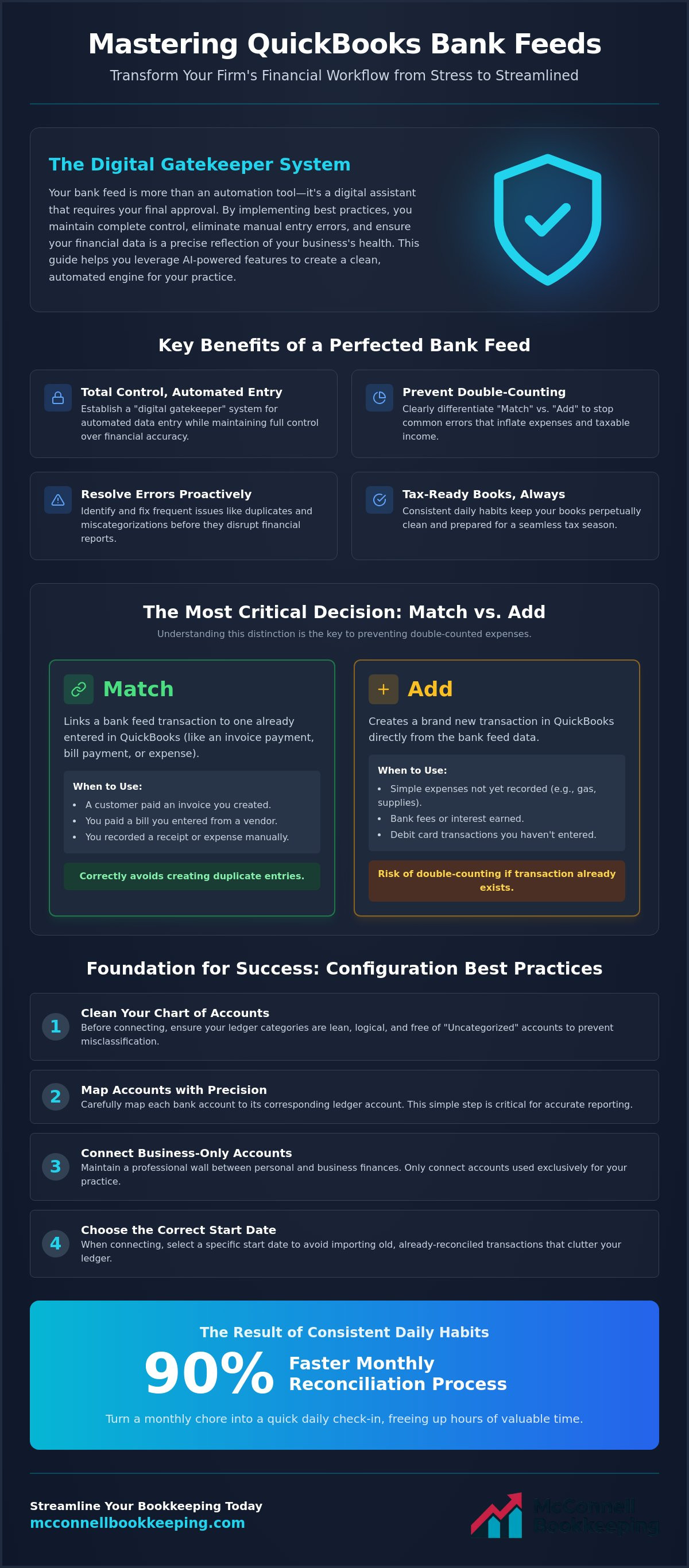
The QuickBooks bank feed acts as a sophisticated bridge between your financial institution and your accounting software. It's a continuous, live stream of data that pulls every transaction directly into your dashboard, serving as a tireless digital assistant for your daily operations. While this automation eliminates the tedious nature of manual entry, it functions best as a "gatekeeper" system. You maintain ultimate control by reviewing each entry, ensuring your books remain a precise reflection of your business reality without the stress of constant data entry.
For Phoenix entrepreneurs, this transition represents a move from reactive bookkeeping to proactive strategic insight. Implementing the best bank feed practices in QuickBooks ensures that instead of waiting until the end of the month to see where your money went, you gain immediate visibility into your spending patterns. This clarity allows you to make informed decisions in real time. Security remains a top priority within this ecosystem. QuickBooks employs industry-standard encryption and multi-factor authentication to ensure your banking credentials and sensitive financial data remain protected at all times.
To better understand this concept, watch this helpful video:
The Role of Bank Feeds in 2026 Accounting
Manual data entry poses a significant risk for audit errors among Arizona small businesses. Using the best bank feed practices in QuickBooks allows Scottsdale law firms to access real-time data for accurate cash flow forecasting. This live connection is the vital precursor to a formal bank reconciliation. Integrating these feeds with a professional monthly bank rec service ensures your financial statements are always audit-ready.
Connecting Your Accounts Safely
Linking your accounts is a straightforward process that yields immediate dividends. Start by selecting your financial institution from the secure list within the Transactions menu. Don't let historical data clutter your ledger; choosing the correct "Start Date" is a critical step to avoid importing old transactions. Once connected, verify the link by checking for the "Updated" timestamp. This confirmation ensures your daily financial activity flows without interruption, keeping your records current and your mind at ease.
By establishing this digital connection, you transform your bookkeeping from a monthly chore into a daily strategic asset. This foundation of real-time data allows you to manage your practice with the confidence that comes from expert oversight. Once your feeds are active, you can focus on the higher-level analysis that drives business growth.
Configuration Best Practices: Setting the Foundation
A clean Chart of Accounts acts as the blueprint for your entire financial house. Before you toggle that live connection, ensure your ledger categories are lean and logical. Mapping your bank accounts to their corresponding ledger accounts with precision eliminates the risk of misclassification from the start. As your strategic mentor, I recommend connecting only business-only accounts to maintain a professional wall between your personal life and your practice's equity. Setting up your "Banking" tab view for maximum productivity, such as grouping by description or date, allows you to process entries with speed and accuracy. This clarity is reinforced by QuickBooks bank feed security protocols, which protect your data while you organize your workflow.
Mapping to the Chart of Accounts
Precision in mapping ensures your Mesa business expenses land in the correct tax categories every single time. One of the most common pitfalls is allowing "Uncategorized Income" or "Uncategorized Expense" to accumulate. These accounts are red flags for auditors and hide the true source of your cash flow. For law practices, mapping IOLTA feeds directly to trust liability accounts is non-negotiable for compliance. If you find your current setup is a historical mess, a professional books cleanup can restore the order you need to move forward with confidence.
The Power of Bank Rules
Bank rules represent the peak of automation within the best bank feed practices in QuickBooks. You can create specific logic for recurring expenses like office rent, medical supplies, or software subscriptions. Use the "Auto-add" feature with caution. While it saves time, some transactions require a human eye to verify the vendor or project allocation. Organize your rules by priority so that complex, multi-layered transactions are filtered first. This methodical approach ensures that your automation serves you, rather than creating more work down the line.
By establishing these rules, you transform a chaotic list of transactions into a streamlined flow of data. You'll spend less time questioning where money went and more time analyzing how your practice is performing. This proactive setup is what separates a cluttered ledger from a strategic financial asset. Once your foundation is solid, you can focus on the daily habits that keep your books in perfect balance.
Matching vs. Adding: The Daily Habits of Accurate Bookkeeping
Mastering the distinction between the "Match" and "Add" functions is the hallmark of a professional ledger. When you select "Match," you link a bank transaction to an existing entry like an Invoice, Bill, or Receipt you've already created. Choosing "Add" creates an entirely new transaction in QuickBooks directly from the bank data. The Golden Rule of the best bank feed practices in QuickBooks is to always look for a match first. This simple habit prevents the accidental inflation of your taxable income caused by double-counting expenses or revenue. The latest updates to QuickBooks Bank Feeds leverage AI to suggest these matches more accurately, but you must still verify "Similar Records Found" to ensure the software isn't linking unrelated transactions based on dollar amounts alone.
Mastering the Matching Workflow
Matching a single bank deposit to multiple customer invoices ensures your accounts receivable stays accurate while providing a clear audit trail for every dollar earned. If the bank amount differs by a few pennies due to processing fees or rounding, use the "Resolve" feature to account for the discrepancy without leaving the transaction hanging. Utilizing digital receipt management solutions provides the necessary backup for these bank matches. This documentation turns a simple checkmark into a robust, audit-proof record that stands up to scrutiny.
When to Use the "Add" Function
The "Add" function is your best tool for handling small, recurring debit card purchases that don't require a pre-entered bill. Whether it's a quick trip for office supplies or a monthly software subscription, adding these on the fly keeps your books current. You must ensure the "Payee" field is always filled. Skipping this step renders your vendor reports useless and makes it impossible to track where your money is going. Mesa dentists, for example, should use specific vendor names for dental lab supplies rather than generic categories. This level of detail allows you to monitor lab costs accurately and identify opportunities for better pricing as your practice grows.
Consistency in these daily habits transforms your bank feed from a list of chores into a source of strategic insight. By prioritizing matches and being intentional with additions, you maintain a clean, high-integrity financial record. This meticulous approach protects your practice and ensures your reports reflect your true business health. Once you've mastered these daily workflows, you'll be better equipped to handle the occasional errors that can disrupt your flow.
Advanced Troubleshooting: Resolving Common Feed Errors
Even a meticulously configured system requires a diligent guardian to handle the occasional technical hiccup. Advanced troubleshooting begins with identifying and deleting duplicate transactions before they ever hit your register. These duplicates often appear after a connection reset or a manual file upload. Implementing the best bank feed practices in QuickBooks allows you to catch these discrepancies early. You should also correct "Bank Transfers" that QuickBooks incorrectly flags as income or expense. Managing the "Exclude" tab is your next line of defense. Use it for personal expenses or duplicate imports that don't belong in your business ledger. If your connection breaks, you can fix it by updating your credentials within the Banking menu. This process restores the flow of data without losing any of your historical records. Following these best bank feed practices in QuickBooks ensures your financial data remains untainted by technical errors.
Handling Transfers and Credit Card Payments
Recording a payment from your Mesa business checking account to your credit card requires a specific workflow to avoid the "Double Income" trap. If you simply "Add" the deposit on the credit card side and the payment on the checking side, you'll artificially inflate your expenses. You must record these as a single transfer. This ensures your balance sheet stays accurate and your cash flow reports remain reliable. Because internal transfers move significant sums of money, they require a robust check of internal controls to prevent unauthorized activity. Using this methodical approach protects your practice's assets from internal and external threats.
Industry-Specific Feed Challenges
A Gilbert dental practice often faces high-volume patient refunds that can clutter the bank feed. You must match these to the original credit memo to keep your patient ledgers clean and accurate. Similarly, matching bulk deposits from merchant services like Stripe or Square to individual client payments is essential for transparency. For law firms, the stakes are even higher. You must ensure law firm trust deposits are never "Added" as revenue. Doing so creates a massive compliance risk and misrepresents your firm's profitability. If these technical challenges feel overwhelming, our team provides expert law practice bookkeeping to ensure your trust accounts remain perfectly managed and audit-ready.
Addressing these errors promptly transforms your bookkeeping from a source of anxiety into a streamlined asset. You'll gain the clarity needed to make strategic decisions for your practice's growth. Once you've cleaned up these common errors, the path to a stress-free monthly reconciliation becomes much clearer. This proactive maintenance is what allows your financial statements to reflect your true business health.
Beyond the Feed: Why Reconciliation is the Logical Conclusion
Reviewing transactions in your bank feed is a vital daily habit, but it's not the final destination for your financial records. A common misconception among many business owners is that a cleared bank feed equals a reconciled account. In reality, the feed is simply the raw data entering your system. Formal bank reconciliation is the essential process of cross-referencing your QuickBooks ledger against your actual bank statement to ensure every penny is accounted for. Implementing the best bank feed practices in QuickBooks serves a specific purpose: it makes the monthly reconciliation process 90 percent faster by ensuring the majority of your data is already categorized and matched accurately.
Verifying your QuickBooks balance against your physical bank statement every 30 days is a non-negotiable habit for any successful practice. This step catches missing transactions, bank errors, or duplicate entries that may have slipped through the feed's automated filters. For Phoenix business owners, this professional oversight acts as the final verification of your business health. It transforms your books from a work-in-progress into a definitive financial record. This clarity provides the relief and confidence that come from knowing your practice is in safe, capable hands.
The McConnell Bookkeeping Approach
Our QuickBooks training for business owners empowers you to master these feeds with the confidence of a seasoned professional. If your feeds have been neglected for months, a professional books cleanup is the logical starting point to restore order to your ledger. Once your foundation is restored, transitioning to our peace of mind bookkeeping services ensures you never have to struggle with the "Match" versus "Add" puzzle again. We act as your diligent guardian, allowing you to focus on client care while we manage the technical intricacies of your bookkeeping.
Preparing for Growth and Loans
Lenders and investors demand reconciled accounts before they even consider a financing request. A "reviewed" bank feed isn't enough to prove financial stability; they need to see that your ledger matches your bank's reality with 100 percent accuracy. You can use your clean, reconciled data to build a robust balance sheet for business loan applications. This level of preparation demonstrates a high level of competence and strategic insight to potential partners. Knowing your numbers are accurate gives you the confidence to negotiate from a position of strength and secure the capital your practice needs to thrive.
By moving beyond the feed and embracing formal reconciliation, you secure the future of your business. You'll move from a state of uncertainty to a state of informed confidence, ready to identify new opportunities for growth. This methodical approach ensures that your QuickBooks bank feed reflects your true business health, providing the clarity you need to lead your practice into 2026 and beyond.
Secure Your Financial Clarity for 2026
You now possess the strategic insight to transform your bank feed from a source of confusion into a powerful engine for growth. By prioritizing the "Match" function and establishing precise bank rules, you eliminate the risk of double-counting and ensure your ledger remains audit-ready. Implementing these best bank feed practices in QuickBooks is the first step toward a proactive financial workflow that saves you hours of administrative labor every month.
While these tools are designed to simplify your life, mastering the nuances of legal and dental bookkeeping often requires a specialized touch. As a QuickBooks ProAdvisor Expert with a deep focus on local Phoenix-area support, I'm here to act as your strategic mentor. Whether you need to resolve a historical mess or want to sharpen your skills, you can schedule a QuickBooks Online Training Session with McConnell Bookkeeping today. We're committed to your prosperity and look forward to helping you achieve the financial clarity your practice deserves. Your business is in safe, capable hands.
Frequently Asked Questions
What is the difference between "Add" and "Match" in the QuickBooks bank feed?
Matching links a bank transaction to an existing entry like an invoice or bill you've already created, while adding creates a brand new record in your books. Utilizing the match function is one of the best bank feed practices in QuickBooks because it prevents the double-counting of income and expenses. This methodical approach ensures your financial statements remain accurate without the digital clutter of duplicate entries that can skew your tax liability.
Why are my bank feed transactions not showing up in QuickBooks?
Transactions often fail to appear due to a temporary connection break or the bank's own internal processing delays. You should first check the "Updated" timestamp on the Banking page and manually click the "Update" button to refresh the live link. If the issue persists, your bank might require you to re-authorize the connection to ensure your data continues to flow securely into your ledger without manual intervention or data gaps.
Can I undo a transaction I added from the bank feed by mistake?
You can easily correct a mistake by navigating to the "Categorized" or "In QuickBooks" tab and selecting the "Undo" button for the specific entry. This action moves the transaction back to the "For Review" tab, allowing you to re-categorize it or match it correctly with the proper documentation. This flexibility ensures that a simple error doesn't permanently disrupt your financial records or lead to inaccurate reporting during your monthly review.
How far back can QuickBooks pull transactions from my bank?
Most financial institutions allow QuickBooks to pull the last 90 days of transaction history automatically upon the first connection. Some banks offer a longer look-back period, but if you need data beyond that initial window, you can manually upload a CSV file from your bank. This process ensures you have a complete historical record to build a reliable foundation for your law practice's bookkeeping and future financial analysis.
Should I use the "Auto-add" feature for my bank rules?
You should use the "Auto-add" feature only for highly predictable, recurring transactions like monthly rent or fixed software subscriptions for your dental practice. While this automation saves significant time, it removes the human oversight required to catch vendor errors or bank discrepancies. A diligent guardian approach involves reviewing most transactions manually to ensure every entry aligns perfectly with your strategic financial goals and maintains the integrity of your books.
Why does my QuickBooks balance not match my bank statement balance even after I finish the feed?
A discrepancy between your QuickBooks balance and the actual bank balance usually stems from uncleared checks or transactions that haven't yet reached the bank feed. It can also occur if you've missed adding or matching items currently sitting in the "For Review" tab. Formal reconciliation is the final step to resolve these differences and ensure your digital ledger perfectly mirrors your physical bank statement with total accuracy for audit purposes.
How do I handle personal expenses that show up in my business bank feed?
You can handle personal expenses by selecting the "Exclude" option in the bank feed, which prevents them from affecting your business profit and loss statement. Alternatively, you can categorize them as an "Owner's Draw" or "Equity" transaction if you prefer to track the cash outflow. Maintaining a professional wall between business and personal finances is a cornerstone of the best bank feed practices in QuickBooks for any practice owner.
Is it safe to connect my bank account to QuickBooks Online?
Connecting your bank account is safe because QuickBooks Online uses the same high-level encryption protocols and security standards as major financial institutions. Your banking credentials are never stored directly by the software, and the connection is a read-only stream that protects your assets from unauthorized access. This secure environment allows you to automate your bookkeeping with total confidence and the peace of mind that your data remains protected.


Comments