2026 Phoenix Small Business Digital Receipt Guide

What if the fading thermal paper in your glovebox is actually a ticking time bomb for your next IRS audit? It's exhausting to spend your Sunday evenings squinting at crumpled receipts or worrying that a lost scrap of paper means a lost tax deduction. You likely feel the frustration of manual data entry stealing time away from your actual work here in the Valley. Our monthly bank reconciliation services Phoenix provide the professional oversight you need to move from administrative stress to financial clarity.
You deserve a system that works as hard as you do. We'll show you how to eliminate paper clutter and automate your accounting with the best digital receipt management strategies for your local business. This guide explores how to create a seamless data flow into QuickBooks Online, ensuring your records are audit-ready and your mind is at ease. You'll learn the exact steps to build a paperless office environment where every transaction is verified, organized, and strategically managed. Let's transform your record-keeping from a source of anxiety into a foundation for growth.
Table of Contents
Digital Receipt Management: A Foundation for Accurate Bank Reconciliations
Digital receipt management is the systematic process of capturing, storing, and organizing business expense records in a cloud-based format. For many Phoenix owners, this marks a significant shift from the traditional "shoebox" method to real-time digital tracking. Understanding what are digital receipts is the first step toward a more efficient back office. By digitizing every slip of paper, you create a permanent, searchable database that serves as the bedrock for your financial health.
This digital foundation is essential because these records serve as the primary evidence for IRS compliance. Without a clear digital image, you're essentially guessing your way through your books. Our monthly bank reconciliations rely on these images to verify that every dollar leaving your account is a legitimate, documented business expense. Professional monthly bank reconciliation services Phoenix ensure that your digital records and bank statements speak the same language, creating a level of audit protection that paper files simply can't match.
To better understand the mechanics of this process, watch this helpful video:
The Hidden Costs of Paper-Based Record Keeping
Relying on physical paper is a gamble that rarely pays off for local entrepreneurs. You lose precious hours searching for specific documents during Arizona's intense tax season, time that could be spent growing your business. Thermal paper receipts are notoriously fragile; the ink often fades until the record is completely illegible, leaving you defenseless in an audit. For Mesa startups, missing even a few small receipts leads to missed tax deductions and unnecessarily high tax bills. A digital system eliminates these invisible costs by preserving every transaction in high resolution, ensuring you never pay more in taxes than you truly owe.
IRS Requirements for Digital Records in 2026
The IRS has clear standards for digital record-keeping that every business must follow. In 2026, digital images must be highly legible and stored in a manner that allows for easy retrieval during an examination. Modern auditors often prefer a digital image over a weathered paper copy because it's easier to verify within your accounting software's audit trail. Maintaining an organized digital history within QuickBooks Online proves your expenses are valid and provides a clear path for any inquiry. This meticulous documentation protects your peace of mind and ensures your business remains compliant with evolving federal standards, making monthly bank reconciliation services Phoenix a strategic asset for your long-term success.
Comparing the Best Digital Receipt Solutions for 2026
Selecting the right digital tool is about more than just snapping photos. It's about building a workflow that supports your financial growth. For most Phoenix entrepreneurs, the journey begins with the QuickBooks Online Mobile App. It offers a seamless, built-in way to capture receipts on the go. If your transaction volume is low, this native tool provides a direct path to organized records without additional subscription costs. You'll find that having your receipts live directly inside your accounting software simplifies your life significantly during tax season.
As your business scales, you might require the advanced automation of Dext or Hubdoc. Dext specializes in high-volume processing, using sophisticated OCR technology to extract data from complex invoices with incredible accuracy. Hubdoc excels at fetching recurring statements directly from your vendors, ensuring you never have to hunt for a utility bill again. For businesses in Scottsdale with growing teams, Expensify remains the gold standard for managing employee reimbursements and corporate card expenses. These tools are most effective when paired with expert oversight. Utilizing professional monthly bank reconciliation services Phoenix ensures that the data captured by these apps aligns perfectly with your actual bank activity.
Comparing Native QBO Tools vs. Third-Party Apps
For a Mesa startup with simple expenses, the standard QuickBooks receipt capture is often enough to maintain clean books. However, dental or law firms frequently deal with multi-page invoices that require the precision of third-party OCR. These specialized apps can distinguish between client-reimbursable costs and general office overhead, a distinction that saves hours of manual sorting. While a dedicated app adds a small monthly fee, the time saved usually outweighs the cost, especially when you consider the accuracy it brings to your year-end reporting. If you're unsure which tool fits your specific workflow, reaching out for professional bookkeeping guidance can clarify your path forward.
Automation Features to Look For
Look for tools that offer direct bank feed matching to streamline your month-end process. This feature identifies potential matches between your receipts and bank transactions automatically, which is the cornerstone of efficient monthly bank reconciliation services Phoenix. Modern solutions also use machine learning to categorize expenses based on your vendor history, reducing the need for manual input. Finally, ensure your chosen tool syncs with cloud storage like Google Drive or Dropbox to create a redundant backup of your vital financial data. This layered approach to data management protects your business from accidental loss and keeps your records audit-ready at all times.
Industry-Specific Workflows for Phoenix Law and Dental Practices
Every business in the Valley operates with a unique rhythm. A law firm's paper trail consists of court filing fees and expert witness invoices, while a dental clinic manages a steady stream of lab fees and medical supplies. Matching your digital capture tool to your specific business model is the only way to ensure your records remain audit-ready. Generic recommendations often fail to account for the rigorous compliance standards required in professional services. Our monthly bank reconciliation services Phoenix are designed to bridge the gap between industry-specific data and clean financial statements.
The transition to a digital workflow is particularly transformative when integrated with strategic accounts payable management. Instead of reacting to bills as they arrive, you gain the ability to forecast cash flow and verify that every payment aligns with an authorized digital record. This proactive approach turns your receipt management from a chore into a powerful tool for business intelligence. It allows you to see where your money goes before it even leaves your account.
Solutions for Law Practices and Professional Services
Law practices in Phoenix require meticulous expense tracking to maintain Arizona State Bar compliance. Digital capture tools allow you to tag receipts with case numbers or client names at the moment of purchase. This ensures that client-reimbursable costs are never missed and that IOLTA trust account activity is documented with precision. When you integrate these digital records with your bookkeeping, you create a transparent audit trail that protects your license and your reputation. It's about more than just organization; it's about professional security and ensuring every billable cost is recovered.
Solutions for Dental and Medical Clinics
Gilbert dental clinics often struggle with high-volume lab invoices and recurring vendor bills. Digital receipt management allows you to categorize these costs by provider or procedure type, giving you a granular view of your clinic's performance. By linking these digital records to dental practice financial metrics, you can identify which services are driving profit and which are being weighed down by excessive overhead. This level of insight allows you to make data-driven decisions about staffing, supply orders, and equipment investments. You'll move from wondering about your margins to mastering them with confidence and clarity.
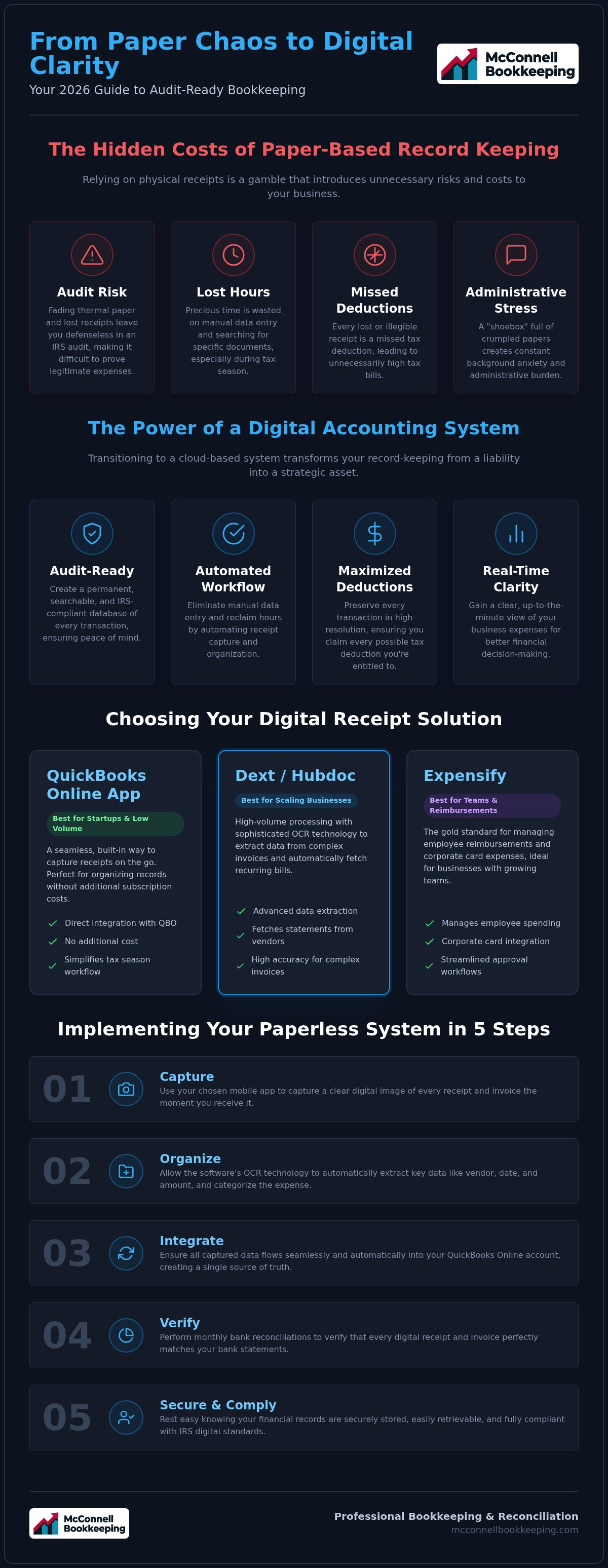
Implementing a Paperless Accounting System in 5 Steps
Transitioning to a paperless office is a strategic move that pays dividends in both time and accuracy. It requires a structured approach to ensure your digital data translates into reliable financial reports. Our monthly bank reconciliation services Phoenix help you navigate this transition with confidence, transforming your administrative burden into a streamlined asset. By following a clear implementation plan, you create a foundation for sustainable growth and audit protection.
Choose your primary digital capture tool. Pick a solution based on your industry volume to ensure the software matches your actual needs, whether you use the native QuickBooks app or a third-party tool.
Set up a dedicated "Accounting" email address. Centralizing all digital invoices and vendor bills in one inbox prevents important documents from getting lost in your personal communication.
Establish a "Capture Habit." Dedicate five minutes daily or thirty minutes weekly to scan physical receipts, ensuring you never face a daunting backlog of crumpled paper.
Connect your capture tool to QuickBooks Online. Creating a real-time data flow allows your expenses to populate your books automatically, reducing the need for manual data entry.
Schedule a monthly review. Utilizing monthly bank reconciliation services Phoenix provides the final layer of defense, confirming that your digital records perfectly match your actual bank activity.
Setting Up Internal Controls for Digital Expenses
Defining who has authority in your Mesa office to upload and approve digital receipts is critical for maintaining financial order. This clarity prevents duplicate entries, which often occur when both a digital scan and a physical copy exist in the same workflow. Implementing a "Review Before Publish" setting in your automation apps allows you to maintain data integrity by checking categories before they enter your permanent records. It's much easier to verify a transaction today than it is to correct a mistake six months from now during tax preparation.
QuickBooks Online Integration Best Practices
Mapping vendors and categories correctly from the start is essential to avoid the need for professional books cleanup later. When you use the "Receipts" tab in QBO, you can match transactions to bank feeds with a single click, creating a permanent link between your money and your documentation. Automated matching is the gold standard for modern Phoenix bookkeeping because it ensures every digital image is tethered to a real bank transaction. If you want to ensure your system is set up for success, you can partner with us for professional bank reconciliation and training to master these digital tools.
Leveraging Professional Bookkeeping to Master Digital Workflows
Software is a powerful tool, but it lacks the strategic insight that a professional partner brings to your business. While digital receipt apps automate the collection of data, the true value lies in how that data is verified and utilized. We provide expert QuickBooks Online training to help you master these digital tools, ensuring your internal processes are both efficient and accurate. This transition from paper chaos to a streamlined digital office isn't just about scanning documents; it's about building a reliable financial ecosystem that supports your long-term goals.
Our monthly bank reconciliation services Phoenix offer the vital oversight needed to maintain this ecosystem. We act as a bridge between your digital captures and your final financial statements, ensuring every image matches your bank activity with surgical precision. This level of meticulous care provides financial clarity for Scottsdale owners who want to lead their industries rather than getting bogged down in administrative troubleshooting. By partnering with a dedicated bookkeeper, you ensure that your technology serves your business strategy, not the other way around.
The McConnell Approach: Strategic Mentorship
Mentorship is the cornerstone of how we support local entrepreneurs. We focus on empowering you through proper system setup, providing a clear roadmap for your financial journey. As your "Diligent Guardian," we oversee your accounts payable and reconciliations to protect your business from errors and fraud. This proactive relationship helps you move away from reactive data entry toward a more sophisticated financial strategy. Whether you're managing a busy law firm or a growing dental practice, having an expert mentor allows you to make decisions based on real-time, verified data rather than intuition alone.
Ready for a Paperless Financial Future?
The relief of knowing your books are permanently audit-ready is a significant competitive advantage. When every expense is backed by a secure digital image, you eliminate the anxiety of missing documentation and the stress of manual searches. These clean digital records make year-end tax preparation a breeze for your Chandler-based CPA, allowing them to focus on high-level tax strategy instead of data cleanup. We invite you to reach out for a consultation to optimize your Phoenix area business finances. Let's work together to build a paperless office environment that provides the peace of mind and professional clarity you deserve.
Secure Your Business Growth with Digital Clarity
Transitioning to a paperless office is more than a convenience; it's a fundamental step toward protecting your business from audit risks and illegible records. By implementing a consistent capture habit and leveraging specialized tools for your law or dental practice, you ensure that every transaction is accounted for properly. This structured approach allows you to focus on your clients and patients while your financial data flows seamlessly and accurately into QuickBooks Online.
Real success happens when you pair these automated workflows with professional mentorship and oversight. Our monthly bank reconciliation services Phoenix provide the diligent review required to keep your books pristine and your strategy focused. As a local Mesa-based team with QuickBooks Online ProAdvisor expertise, we're deeply committed to the prosperity of our neighbors in the Phoenix valley. We invite you to Get the Peace of Mind Your Business Deserves, Schedule a Consultation Today. You've worked hard to build your business; let's work together to ensure its financial future is secure, organized, and clear.
Frequently Asked Questions
Is a digital photo of a receipt good enough for the IRS in 2026?
Yes, a digital photo is sufficient as long as it's a complete and accurate reproduction of the original document. In 2026, the IRS prioritizes legibility and your ability to retrieve records quickly during an examination. Most modern bookkeeping systems automatically store these images alongside the transaction record. This digital trail provides stronger protection than fading thermal paper, ensuring your business remains compliant even if the physical copy is lost.
What is the best receipt scanning app for QuickBooks Online in Phoenix?
The best app depends on your specific transaction volume and industry needs. For simple Mesa startups, the native QuickBooks Online mobile app is often the most cost-effective solution. High-volume law or dental practices frequently benefit from the advanced OCR capabilities of Dext or Hubdoc. These third-party tools offer superior automation for complex invoices, making them a strategic choice for businesses looking to streamline their data entry and improve reporting accuracy.
How do I handle receipts that are sent to my email versus paper ones?
You should centralize both digital and paper receipts into a single, unified workflow. Most modern receipt tools provide a dedicated email address where you can forward digital invoices directly from your inbox. For paper receipts, you simply use a mobile app to snap a photo. This integrated approach ensures that all your documentation lives in one secure place, which is essential for the success of monthly bank reconciliation services Phoenix.
Can I throw away my paper receipts after I scan them into QuickBooks?
You can typically dispose of paper receipts once you've verified that the digital scan is perfectly legible and backed up in the cloud. The IRS accepts digital images as primary records provided they're stored systematically. However, we recommend keeping a physical file for high-value assets or complex legal documents for at least three years as a secondary precaution. Always ensure your digital backup is secure before you reach for the shredder.
Do digital receipt solutions help with monthly bank reconciliations?
Digital receipt solutions are the backbone of efficient monthly bank reconciliation services Phoenix. By attaching a digital image to every transaction, you give your bookkeeper the evidence needed to verify each line item against your bank statement. This automated matching process eliminates the guesswork and ensures your books are audit-ready every month. It's the most effective way to identify missing expenses and prevent duplicates before they skew your financial reports.
How much does it cost to set up a digital receipt management system?
The cost varies based on the software you choose and the volume of your transactions. Basic receipt capture is included in your QuickBooks Online subscription at no extra charge. If you require advanced automation, third-party apps like Dext or Shoeboxed typically range from $15 to $50 per month. While there's a small software investment, the time saved on manual data entry and the increased tax deductions usually provide a significant return on your investment.
Is digital receipt management secure for my sensitive business data?
Modern digital receipt platforms utilize bank-level encryption and secure cloud storage to protect your sensitive financial information. These systems are often more secure than physical filing cabinets, which are vulnerable to fire, theft, or environmental damage. By using a reputable provider that integrates directly with QuickBooks Online, you ensure your data is protected by multiple layers of security. This meticulous approach to data safety is a core part of our professional guardianship.
How does McConnell Bookkeeping help with receipt organization in Mesa?
We provide specialized QuickBooks Online training to help Mesa business owners implement a customized digital workflow. Our team doesn't just give you a tool; we mentor you on how to use it to achieve financial clarity. By overseeing your monthly reconciliations, we ensure that every digital receipt is correctly categorized and matched to your bank activity. This partnership transforms your record-keeping from a daily chore into a strategic asset for your business growth.


Comments